

Qualys is a powerful tool designed for managing vulnerabilities in highly secure environments. It helps cleared professionals identify, assess, and address system weaknesses while meeting strict federal compliance standards like FISMA, FedRAMP, and CISA directives. The platform simplifies tasks such as internal scanning, asset visibility, and remediation, ensuring sensitive systems remain secure.
Key Takeaways:
- Compliance: Supports FedRAMP High, FISMA, and CISA requirements.
- Asset Management: Provides 100% visibility across on-premises, cloud, and air-gapped networks.
- Vulnerability Prioritization: Uses TruRisk scoring to focus on the most critical threats.
- Automated Workflows: Streamlines patching, reporting, and remediation processes.
- Customizable Tools: Offers dynamic tagging, dashboards, and policy compliance checks.
Whether you’re securing classified networks or managing vulnerabilities in restricted environments, Qualys provides the tools to stay ahead of threats and meet compliance needs.
Practical Vulnerability Management using Qualys | Free Course for Security Analyst and GRC Analyst
sbb-itb-bf7aa6b
Getting Started with Qualys VMDR
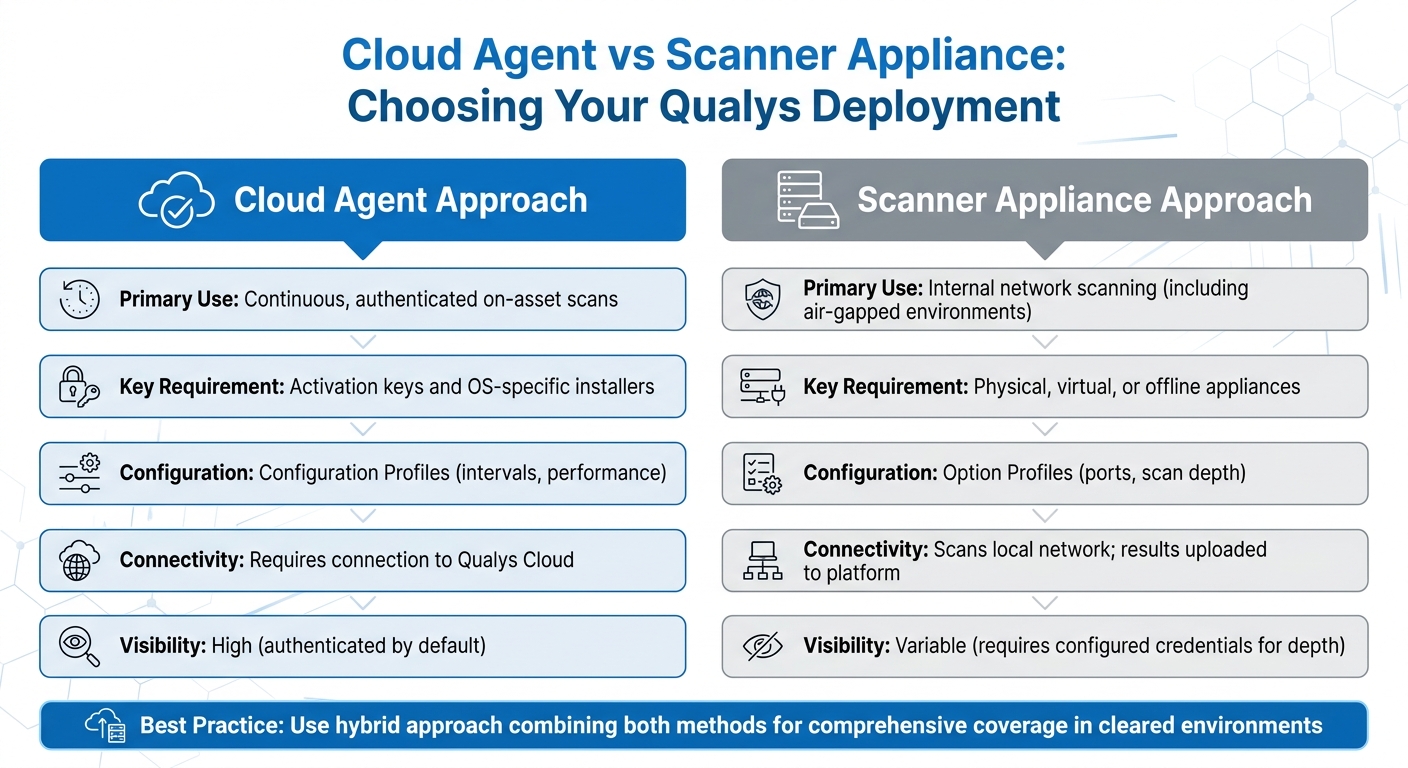
Qualys Cloud Agent vs Scanner Appliance Deployment Comparison
Setting Up Qualys in Cleared Environments
When you first log in to Qualys, make sure to immediately change the default password. Then, configure password settings – like expiration periods, failed login limits, and reset limits – under Users > Setup > Security to match your organization’s policies [4]. For security, users can reset their password only three times within an hour [4]. It’s also a good idea to add at least one extra user with a Manager or Unit Manager role. This ensures you avoid account lockouts and maintain access even if the primary account is compromised [4].
Next, decide on your deployment approach: Cloud Agents, Scanner Appliances, or a combination of both. Cloud Agents are great for ongoing, authenticated scans directly on assets. They require activation keys and OS-specific installers to set up. On the other hand, Scanner Appliances are particularly useful for scanning internal networks, especially in air-gapped environments. For high-security settings, cleared professionals can use physical, virtual, or offline scanner appliances to meet strict operational demands [10].
| Setup Component | Cloud Agent Approach | Scanner Appliance Approach |
|---|---|---|
| Primary Use | Continuous, authenticated on-asset scans | Internal network scanning (including air-gapped environments) |
| Key Requirement | Activation keys and OS-specific installers | Physical, virtual, or offline appliances |
| Configuration | Configuration Profiles (intervals, performance) | Option Profiles (ports, scan depth) |
| Connectivity | Requires connection to Qualys Cloud | Scans local network; results uploaded to platform |
| Visibility | High (authenticated by default) | Variable (requires configured credentials for depth) |
For more complex cleared environments, use Custom Networks to handle overlapping IP ranges effectively [6]. You can add assets by IP address or discover them using the "Maps" feature. To protect sensitive or mission-critical systems, set up an Excluded Hosts list. This ensures these systems are never scanned, even if they’re accidentally included in a scan target [7].
Although not mandatory, authenticated scanning is strongly recommended in cleared environments. By configuring authentication records, you allow the system to log in to target assets, providing deeper insights compared to unauthenticated scans [10]. To enhance efficiency, establish remediation policy rules. These rules automate ticket creation, specify which vulnerabilities or hosts should trigger actions, assign tasks to either the Asset Owner or the User Running the Scan, and set deadlines for resolution [11].
These steps lay the groundwork for using VMDR’s integrated tools, which simplify vulnerability management and improve security.
Qualys VMDR Core Features
Once your setup is complete, you can take advantage of the full range of Qualys VMDR’s capabilities. Tailored for cleared environments, VMDR combines asset discovery, vulnerability assessment, threat prioritization, and remediation – all in real time [4][9]. With over 200 searchable attributes, you can locate specific systems across large networks in seconds [12].
Dynamic asset tagging is a standout feature. It automatically organizes assets based on their attributes, making reporting and policy management much easier [6]. For targeted scans, you can create Search Lists to focus on specific vulnerabilities (QIDs). This is especially helpful when you don’t need a full scan or when compliance audits require a narrow scope [10][11]. By doing this, you can reduce your network footprint while prioritizing critical threats.
Another powerful tool is the Isolation Jobs feature, which helps you manage assets with unresolved vulnerabilities. With the "Isolate Now" option, you can quarantine an asset or limit its communication. While isolated, the asset’s Qualys Detection Score (QDS) drops to zero until the issue is permanently resolved [8]. You can also assign up to 200 co-authors to a single isolation job and set up quarantine notifications for as many as ten email recipients [8].
For compliance purposes, you can import CIS-certified policies or SCAP policies from the Qualys library to ensure systems meet regulatory standards [5]. To avoid disruptions during critical operations, configure blackout windows in Cloud Agent profiles [7]. Additionally, enable syslog forwarding from scanner appliances to a remote server to maintain centralized audit trails, which are often required in cleared environments [7].
Data retention is another key consideration. Enterprise and Consultant plans offer a default retention period of 6 months, with a maximum of 13 months. For Community Edition users, retention defaults to 3 months and maxes out at 6 months [7]. POC Managers can enforce consistent retention settings across the subscription using the Storage Setup dialog’s "Apply settings to all users" option [7].
Using Qualys Tools for Vulnerability Assessment
Dashboards, Widgets, and Search Capabilities
Qualys Unified Dashboards bring together data from all Qualys applications, offering a comprehensive view of your security environment [14][18]. In sensitive or restricted environments, you can use asset tags to limit dashboard access, ensuring proper compartmentalization [14].
Custom widgets can be created using Qualys Query Language (QQL) to focus on specific asset attributes, such as assetId or last location, or vulnerability details like severity and detection age [13]. For example, a QQL query like criticalityScore>=4 OR riskScore>=700 helps pinpoint your most critical systems [17]. Venn widgets are particularly helpful for visualizing overlaps, such as identifying "High Value" assets that also have "High Risk" vulnerabilities, enabling faster prioritization [17].
By default, dashboards can accommodate up to 80 widgets, though this limit can be adjusted with support from Qualys [15]. Historical data is retained for 90 days, allowing you to analyze trends in vulnerability counts over time [18][19]. To streamline workflows, the "Keep Selection Persistent" feature lets you save tag filters at either the subscription or user level [16]. You can even export dashboard configurations in JSON format for consistent application across different environments or subscriptions [15][19].
These tools provide a strong foundation for understanding how Qualys evaluates and prioritizes vulnerabilities.
Understanding Qualys Severity Levels and Reports
Qualys employs three scoring systems to assess vulnerabilities: QVSS (0–10 scale) for visual insights, QDS (1–100 scale) for automation, and TruRisk (0–1,000 scale) for asset-focused risk analysis [20][22][23]. Unlike CVSS, which focuses solely on technical severity, QVSS and QDS also consider external factors like active exploitation and malware links. For instance, CVE-2024-50302 may have a "Medium" CVSS score of 5.5, but Qualys assigns it a "Critical" QVSS score of 9.5 due to its association with weaponized exploits and active malware [20][22].
"A vulnerability with a low CVSS score can still have a high QDS because attackers often exploit overlooked vulnerabilities to evade detection." – Qualys Documentation [22]
When prioritizing remediation, focus on vulnerabilities with QVSS scores between 9.0–10.0 or QDS scores of 90–100, as these often indicate active exploitation [20][22]. The VMDR Prioritization Report is a useful tool for identifying critical vulnerabilities by correlating factors like detection age, Real-Time Threat Indicators (RTIs), and the attack surface [21]. You can also use QQL to uncover hidden risks. For example, a query like vulnerabilities.vulnerability.cvss3Info.baseScore<4.0 and vulnerabilities.detectionScore>79 reveals vulnerabilities with low CVSS scores but high detection scores [22].
In sensitive environments, you can refine scores further with Environmental Adjustments, which take into account whether assets are internet-facing, critical systems, or protected by controls like EDR or network segmentation [20]. Assigning criticality levels (1–5) to assets through tags allows the TruRisk engine to weigh overall risk based on the highest criticality score [23].
These scoring systems, combined with real-time intelligence, enhance your ability to prioritize risks effectively.
Integrating Threat Intelligence for Risk Prioritization
Qualys tracks over 300,000 CVEs using data from more than 25 threat intelligence sources [22]. This approach shifts the focus from technical severity to real-world risk by incorporating external intelligence, exploit maturity, and attacker activity [22][25]. Real-Time Threat Indicators (RTIs) like "Zero-day", "Active Attack", "Ransomware", and "Wormable" help you respond quickly to high-risk vulnerabilities [22].
Qualys assigns scores to vulnerabilities even before they appear in the National Vulnerability Database (NVD), relying on vendor advisories and internal research to prevent delays in remediation [22]. For CVEs not yet listed in the NVD, Qualys uses a weighted scoring model – 20% from available CVSS data and 80% from RTI analysis [22]. If a CVE is linked to the CISA KEV catalog or a known threat actor, it receives a weight of over 90% in the scoring system [22].
"QVSS elevates the score because attackers are already exploiting it, creating significantly higher real-world risk than CVSS indicates." – Qualys Documentation [20]
To stay ahead of emerging threats, monitor widgets like "Top 20 Trending CVEs in the Wild" and "Latest 20 CVEs with Weaponized Exploits" [24]. Qualys recommends addressing vulnerabilities with a TruRisk-QDS score of 70 or higher [22]. The QDS consolidates multiple CVEs into a single actionable score for a Qualys ID (QID), ensuring that critical vulnerabilities are not overlooked [22]. This method helps identify vulnerabilities that may have low CVSS scores but pose high risks due to active exploitation [22].
Remediation and Compliance with Qualys
Qualys provides tools that simplify vulnerability management by combining automated workflows with integrated asset management. This approach is crucial for maintaining operational authorization in high-security environments.
Patch Management Workflows
Qualys makes patching straightforward with its "Patch Now" feature in the VMDR Prioritization report. This tool identifies and deploys necessary patches automatically, speeding up the process of addressing critical vulnerabilities [26][31]. For recurring tasks, you can set up QQL-based jobs, which handle up to 2,000 patches in order of their release date [28]. When patches aren’t available or downtime is limited, mitigation scripts can be deployed through the MTG application [29].
The platform supports Windows, Linux, and Mac systems, eliminating the hassle of using multiple tools for different operating systems [29]. For environments with strict oversight, Qualys integrates with ServiceNow, automating the entire workflow from vulnerability detection to ticket closure after a follow-up scan confirms remediation. This ensures every action is documented with an approved change ticket, creating a clear audit trail [27][30]. Additionally, the "Show Only Patchable" toggle in the VMDR Prioritization report helps you focus on vulnerabilities with actionable solutions [31].
CSAM further enhances this process by refining asset prioritization for targeted vulnerability management.
Using CSAM for Asset-Centric Vulnerability Response
CyberSecurity Asset Management (CSAM) shifts the focus from individual vulnerabilities to the overall risk posed by assets. By assigning an Asset Criticality Score (ACS) to each system, CSAM determines its importance to your organization. It then combines this score with vulnerability data to calculate a TruRisk Score, allowing you to address risks based on their impact on your operations rather than just their technical severity.
CSAM gathers data from Cloud Agents, IP scanners, passive sensors, and third-party connectors, often uncovering up to 30% more assets [36]. It also supports up to 20 custom attributes per asset, such as procurement codes or business unit assignments, all searchable via QQL. This level of detail helps pinpoint which assets need immediate attention based on their role in your organization.
"CSAM doesn’t just show us EoL/EoS software and operating systems, it provides the scope of impact so we can understand cyber risk." – Beatrice Sirchis, Vice President of Application Security, IDB Bank [36]
CSAM identifies hardware and software nearing End-of-Life (EoL) or End-of-Support (EoS) up to 12 months in advance, allowing you to address tech debt proactively [36]. The "Quick Actions" menu lets you activate unmanaged assets for VMDR, Certificate View, or Policy Compliance scans instantly. Furthermore, bi-directional CMDB synchronization ensures remediation tickets align with asset data with 96% accuracy, helping IT and security teams stay on the same page [36].
Meeting Compliance Requirements
With CSAM prioritizing assets, Qualys tools help ensure systems meet both regulatory and internal compliance standards.
Policy Compliance (PC) evaluates IT assets against specific policies, identifying gaps across on-premises, remote, and cloud environments [35]. The Security Configuration Assessment (SCA) add-on for VMDR checks for configuration issues based on Center for Internet Security (CIS) Benchmarks [30][35]. VMDR also supports internal, external, and PCI scanning requirements, all within one solution [30].
File Integrity Monitoring (FIM) safeguards sensitive systems by detecting critical changes and incidents [32]. For supply chain compliance, Software Composition Analysis (SwCA) within CSAM provides insights into embedded open-source and commercial software components [33]. CSAM also offers detailed reporting to meet compliance needs, covering hardware and software lifecycles and licensing information [33].
Qualys supports scheduled reports – daily, weekly, or monthly – and provides pre-configured or customizable templates for managing vulnerability and asset data [32]. The VMDR Prioritization Report highlights the riskiest vulnerabilities on critical assets and can be exported as dashboard widgets or CSV files for audits [34]. Unified Dashboards bring together data from all Qualys applications, offering real-time insights into threat exposure and remediation progress. This feature simplifies compliance audits and supports efficient oversight [30][32].
Best Practices for Using Qualys in Cleared Environments
Cleared environments require precise and consistent vulnerability management to maintain operational authorization while minimizing administrative workload. The following practices help security teams strengthen operational security while building on earlier configuration and scanning strategies.
Scan Configurations for Cleared Networks
In most cleared environments, a hybrid scanning approach is the standard. This combines local scanner appliances for internal network visibility with Cloud Agents for continuous, authenticated on-asset assessments [38]. For the best results, configure authenticated scanning to allow for a deeper system evaluation.
Performance tuning is essential in sensitive environments. Set CPU limits to at least 10% and adjust the CPU throttle to 20ms or below. Lower CPU limits (below 10%) can significantly slow scan times and delay updates [39]. To avoid duplicate asset entries and maintain a unified view of vulnerabilities, enable "Agent Scan Merge" [39].
Automated purge rules are also crucial – configure them to remove data from assets that haven’t been scanned within a set period [40]. For environments like VDI or shared infrastructure, use settings like "Scan Delay" and "Scan Randomize" to stagger agent uploads and reduce bursts in I/O activity [39].
Continuous Monitoring and Reporting
Continuous monitoring goes beyond scan configurations, ensuring vulnerabilities are identified and addressed promptly.
Set the VM Data Collection Interval to 240 minutes (4 hours). This ensures that new or fixed vulnerabilities are quickly reflected on the platform [39]. For Policy Compliance and Security Configuration Assessment (SCA), longer intervals – ranging from 2,160 minutes (36 hours) to 10,080 minutes (7 days) – help reduce asset strain while maintaining reliable compliance data [39].
To keep agents updated with minimal data usage, set the Agent Status Interval to 900 seconds (15 minutes). This uses less than 1KB of data per check-in [39]. Real-time alerts are particularly useful for spotting unexpected activity, such as newly opened ports, unauthorized software installations, or unfamiliar hosts, without waiting for the next scheduled scan [41].
Building a Repeatable Vulnerability Management Process
A standardized workflow ensures consistent vulnerability management across cleared environments, as outlined in the Qualys VMDR setup.
Use a default configuration profile with optimized settings for most assets, limiting the number of unique profiles to reduce complexity [39]. Incorporate CIS-certified policies from the Qualys library to align with industry standards [42].
For better asset separation and role-based access control, assign distinct Activation Keys to different operating companies or sensitive enclaves [39]. Enable "Scan on Startup" for Windows Cloud Agents (version 5.1+) to ensure immediate assessment when assets join the network [37]. Blackout windows should only be treated as exceptions during peak mission-critical activities [39].
For high-performance Windows servers in cleared environments, enable "In-Memory SQLite Databases" to minimize disk I/O, though it may increase RAM usage slightly [39]. Additionally, set the Cloud Agent Chunk Size to at least 2,048 KB for file fragment uploads unless the network bandwidth is severely limited [39].
Conclusion
Mastering Qualys tools is a game-changer for meeting strict federal requirements. With its unified approach to asset management, vulnerability detection, and patch management, the platform addresses a critical issue: 38% of cyber intrusions stem from unpatched vulnerabilities [44].
Beyond technical expertise, understanding how to integrate Qualys with ITSM platforms like ServiceNow or BMC can significantly improve efficiency, cutting ticket resolution times by as much as 50% [3]. Additionally, the ability to identify End-of-Life systems up to a year in advance allows agencies to tackle technical debt before it turns into a security risk [3]. These skills not only enhance your career potential but also help organizations align with key compliance standards like FISMA M-24-04, FedRAMP, and NCSC guidelines – essential for security-cleared roles.
Current security practices often fall short of ideal standards. For instance, UK organizations take an average of 17 days to fix external-facing vulnerabilities, far exceeding the NCSC’s recommended 5-day remediation window [1]. Professionals who adopt automated workflows and continuous monitoring can help close this gap while advancing their own expertise and value in the field.
To take full advantage of these opportunities, start with Qualys’s free certification program. Focus on the Vulnerability Management Detection and Response (VMDR) and CyberSecurity Asset Management (CSAM) learning paths to meet federal asset visibility requirements [2][43]. By gaining hands-on experience and certifications, you’ll position yourself as a leader in integrated vulnerability management, bridging IT operations, security, and risk management teams. This proactive approach not only strengthens your career but also equips you to drive meaningful improvements in organizational cybersecurity.
FAQs
When should I use Cloud Agents vs. scanner appliances?
Cloud Agents provide continuous, real-time monitoring across on-premises, cloud, and remote environments. They are especially helpful in dynamic or distributed setups. These lightweight tools are always active, ensuring constant visibility and even syncing data when offline.
On the other hand, scanner appliances are ideal for scheduled, thorough scans of specific network segments or assets where installing agents isn’t feasible. They work particularly well in static environments or when authenticated, on-demand scans are needed.
How do I prioritize fixes using TruRisk, QDS, and QVSS?
To determine which fixes to prioritize, the first step is creating a clear inventory and evaluating the criticality of assets. From there, apply QDS to gauge how severe each vulnerability is and calculate the TruRisk™ Score. This score factors in both the importance of the asset and the surrounding threat landscape. For a straightforward comparison, use QVSS, which simplifies vulnerability ratings into an easy-to-understand 0-10 scale. This approach helps you focus on the highest-risk issues, ensuring your efforts have the greatest impact on reducing risk.
What’s the best way to set up Qualys for air-gapped networks?
To set up Qualys for air-gapped networks, the Offline Scanner Appliance is your go-to solution. Start by downloading the OVA image and deploying it on a virtualization platform such as VMware. Configure the network adapters to match your specific environment. Next, generate a personalization code to register the scanner. Once registered, switch the appliance to OFFLINE SCANNING mode. This setup ensures secure vulnerability scans within the isolated air-gapped network.