

Master QRadar to excel in high-security SOC roles. This guide is designed for security-cleared analysts working in government or defense sectors, offering actionable skills for threat detection, incident response, and compliance with standards like CMMC and NIST 800-171. QRadar combines SIEM, SOAR, EDR, and NDR, enabling full incident lifecycle management. Key updates, such as quantum-proof capabilities in version UP15 (April 2026), enhance its relevance for secure environments.
Key Highlights:
- QRadar Expertise: Learn advanced threat hunting with Ariel Query Language (AQL), configure Custom Rules Engine, and leverage User Behavior Analytics (UBA).
- Technical Skills: Understand OSI/TCP models, key ports, firewalls, and Linux/Windows event analysis.
- Certifications: IBM Certified SOC Analyst – QRadar SIEM V7.5 Plus and CompTIA CySA+ are crucial for career growth.
- Hands-On Practice: Use QRadar Community Edition for lab training and real-world scenario exercises.
- SOC Operations: Manage offenses, perform root cause analysis, and align workflows with MITRE ATT&CK.
Next Steps: Focus on certifications, hands-on labs, and expanding skills in compliance frameworks and query languages like AQL, KQL, and SPL.
Learn IBM QRadar in 7 Hours 🔥 | SOC & Threat Hunting Course
sbb-itb-bf7aa6b
Technical Prerequisites for QRadar
To effectively work with QRadar, it’s essential to have a solid grasp of networking and operating system fundamentals.
Networking and Operating System Basics
A strong understanding of the OSI Model (7 layers) and the TCP/IP Stack (4 layers) is crucial for analyzing network traffic and identifying malicious activity [7]. This includes differentiating between TCP (reliable, using a three-way handshake) and UDP (faster but connectionless) [7]. Familiarity with key port numbers – such as 22 for SSH, 53 for DNS, 80 for HTTP, 443 for HTTPS, and 3389 for RDP – enables quicker detection of anomalies in flow records [7].
"Understanding [OSI] layers is crucial for analyzing network traffic and identifying malicious activity." – Aayushi Pawar, Cybersecurity Researcher [7]
Proficiency in IP addressing is also vital. You’ll need to work with IPv4 and IPv6, CIDR notation, subnetting, and private address spaces defined by RFC1918 to pinpoint source and destination assets in QRadar [7]. In fact, 17.54% of permanent SOC Analyst job postings explicitly require TCP/IP knowledge, and 26.32% highlight the need for foundational firewall skills [[6]](https://www.itjobswatch.co.uk/jobs/uk/soc analyst.do). You should also understand the differences between stateful and stateless firewalls, Access Control Lists (ACLs), and IDS/IPS systems to interpret security data ingested by QRadar [7].
Since QRadar operates on Linux, mastering Linux service management (e.g., using systemctl) and tools like Bash is critical. Additionally, skills in Windows event log analysis and PowerShell enhance your troubleshooting capabilities [5][[6]](https://www.itjobswatch.co.uk/jobs/uk/soc analyst.do). Familiarity with QRadar’s core services, such as ecs-ec (event parsing and mapping) and ecs-ep (rule processing), is also beneficial for resolving data ingestion issues [5].
With these foundational skills, you’ll be better equipped to spot attack patterns and make the most of QRadar’s capabilities.
Threat Vectors and Attack Patterns
The ability to recognize common attack patterns in logs and flows is what sets effective analysts apart. For example, you should be able to identify beaconing activity, where malware regularly communicates with command-and-control (C&C) servers [8]. Similarly, spotting unusual port and protocol usage, like MySQL traffic on port 13306 instead of the standard 3306, can indicate a compromise [8].
Phishing remains one of the most common threats, often involving malicious links in emails that exploit vulnerabilities such as improper bounds checking in browser tags [10]. With QRadar’s integration with IBM X-Force Threat Intelligence, you can cross-check IP addresses and domains against known malicious activity [8]. For detecting insider threats, QRadar’s UBA (User Behavior Analytics) can help identify authentication anomalies, policy violations, and suspicious access to sensitive data [8][9].
Understanding network flow anomalies is especially valuable in environments where logging might be disabled by attackers. For instance, QRadar’s QFlow data can still provide insights into source and destination details, as well as data transfer sizes [10]. Using QFlow’s Deep Packet Inspection (DPI), you can detect sensitive data exposure, such as credit card numbers or Social Security numbers, within traffic payloads [8]. While QRadar comes with over 750 pre-configured rules to detect abnormal behaviors and attacks, fine-tuning these rules requires a clear understanding of underlying threat patterns [8].
"Logs + Flows + Threat Intel + Vulnerabilities + Asset Discovery = QRadar’s real power." – Ankit Bandu Jungade, Security Professional [8]
It’s important to note that enterprise SIEMs detect only 21% of techniques outlined in the MITRE ATT&CK framework, and 13% of correlation rules fail to trigger [1]. This underscores the importance of understanding protocols and attack patterns – automation alone isn’t enough.
QRadar Architecture and Core Components
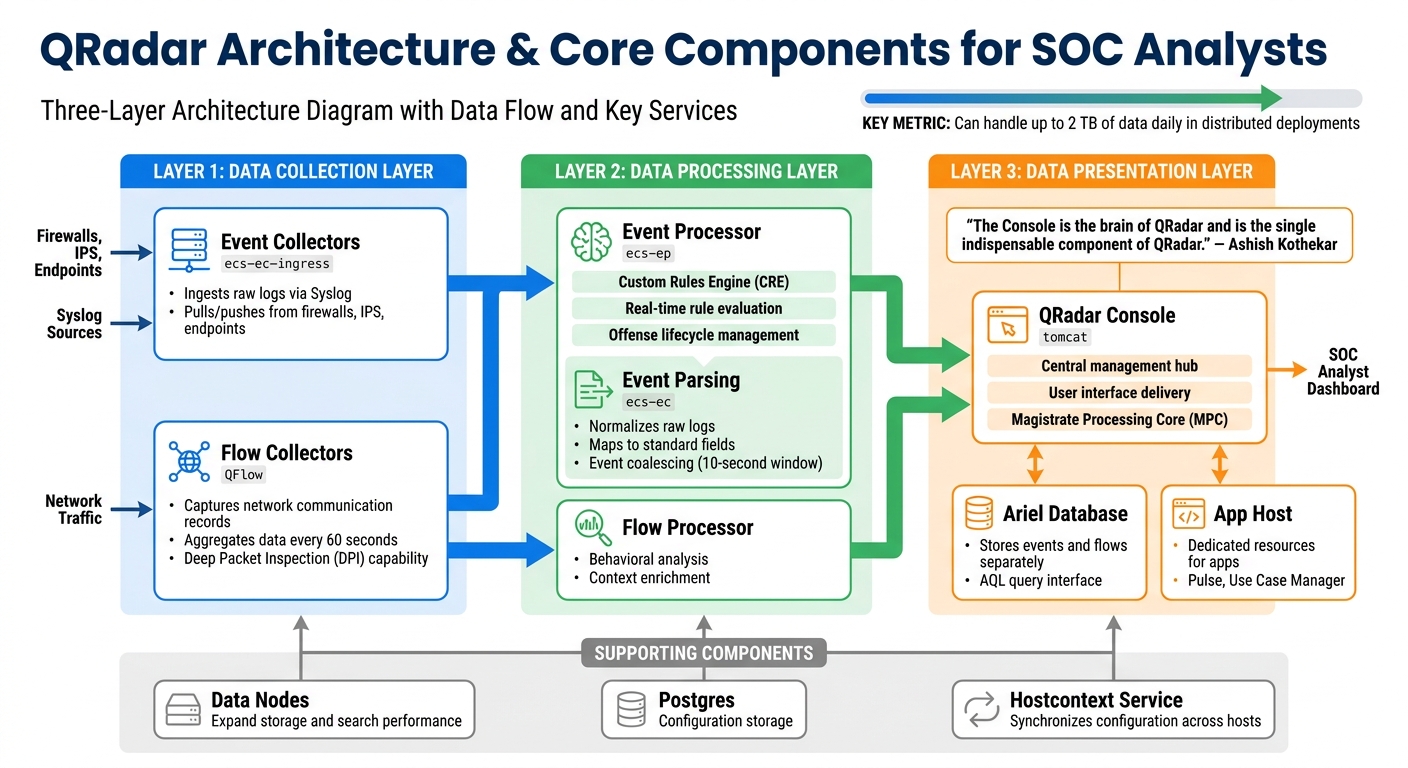
QRadar Architecture: Three-Layer Data Processing System
QRadar operates on a three-layer architecture: data collection, processing, and presentation. Here’s how it works: the Data Collection Layer gathers raw logs and network flows, the Data Processing Layer applies correlation rules to identify potential threats, and the Data Search Layer provides a user interface for analysts to investigate and respond [3]. This modular setup allows for horizontal scaling without compromising performance.
Main Components of QRadar
At the heart of QRadar is the QRadar Console, which serves as the central management hub. It uses the Tomcat service to deliver the user interface, manages offenses via the Magistrate Processing Core (MPC), and oversees reporting and administrative tasks [5][11].
"The Console is the brain of QRadar and is the single indispensable component of QRadar. It can collect and process data and throw alerts based on the rules." – Ashish Kothekar [5]
Event and Flow Collectors are the entry points for data. They ingest raw logs from sources like firewalls, IPS devices, and endpoints through protocols such as Syslog. The ecs-ec service then parses these logs into readable formats and normalizes them, mapping data to standard fields like IP addresses and usernames [11]. A handy feature called event coalescing consolidates identical events occurring within a 10-second window into a single record, saving both storage and processing power [11].
Event and Flow Processors use the Custom Rules Engine (CRE) to evaluate incoming normalized data against security rules in real time. When a rule condition is met, the ecs-ep service generates offenses and manages their lifecycle, including creation, renaming, and linking related events [5][11]. Flow data, which provides behavioral insights, is aggregated and forwarded to processors every 60 seconds, offering context that individual event logs may overlook [3].
Data Nodes expand storage and enhance search performance by redistributing data across the deployment [11]. The Ariel Database stores event and flow data separately from configuration details (which are kept in Postgres). Analysts can use Ariel Query Language (AQL) to perform forensic searches [5]. The App Host ensures that applications like Pulse and Use Case Manager have dedicated resources, preventing them from overloading the Console during investigations [3].
| Component | Primary Service | Role in SOC Operations |
|---|---|---|
| Console | tomcat |
Provides the UI, manages user sessions, and centralizes management [5] |
| Event Collector | ecs-ec-ingress |
Ingests raw logs from sources via pull or push mechanisms [5][3] |
| Event Processor | ecs-ep |
Matches events against rules (CRE) and manages offense lifecycles [5] |
| Flow Collector | QFlow |
Captures network communication records for behavioral context [5][3] |
| Data Node | N/A | Adds storage and processing capacity for scaling [3] |
| App Host | N/A | Dedicated environment for running apps without taxing the Console [3] |
These components work together seamlessly to enhance SOC operations.
How QRadar Supports SOC Operations
QRadar simplifies log analysis by parsing and normalizing raw data through the ecs-ec service. This ensures that analysts see standardized fields like "Authentication Failure" regardless of the device generating the logs [5]. The Event Processor evaluates incoming data in real time, triggering offenses as soon as threats are detected [3]. By grouping related events, QRadar reduces alert noise and helps analysts focus on what matters.
Events provide immediate alerts, while flows offer a broader behavioral perspective [3]. For instance, an event might flag a single failed login attempt, but flow data could reveal that the same IP has been probing multiple internal systems over hours. In larger deployments, QRadar can handle up to 2 TB of data daily using distributed Event Processors configured for high availability [12].
The hostcontext service ensures configuration changes made on the Console are synchronized across all managed hosts, maintaining consistency in distributed architectures [5]. Analysts can monitor this service using systemctl status tomcat to troubleshoot UI availability issues on the Console [5]. Beyond automated offenses, QRadar allows analysts to craft detailed AQL queries to hunt for specific patterns, such as identifying IPs transferring over 1 MB of data or users logging into VPNs from multiple locations [3].
This architecture is indispensable for meeting the high demands of modern cybersecurity operations.
Log Analysis and Incident Response Workflows
Log Analysis and Event Correlation
QRadar takes a smarter approach to detecting attack patterns by correlating events and flows, rather than relying on isolated logs. Here’s how it works: events capture specific actions, like authentication failures, while flows provide a broader view of network traffic, showing the volume and direction of data movement. For instance, spotting eight failed login attempts (Event ID 4625) from one IP address within five minutes could signal a brute force attack. Similarly, over 500 DNS queries with average lengths exceeding 50 characters might point to DNS tunneling.
To dig deeper into threats, analysts can use Ariel Query Language (AQL). This helps uncover advanced risks, like fileless malware hidden in PowerShell commands – look for terms such as frombase64string, iex, or -enc in Sysmon Event ID 4104. Suspicious administrative activity can also be flagged by monitoring Domain Admin logins (Event ID 4624) during unusual hours, such as midnight to 5:00 AM, using Windows and Active Directory logs. It’s critical to ensure that Device Support Modules (DSMs) are parsing logs correctly because unparsed or "unknown" events might leave gaps in visibility.
"The strongest use-case is only as good as the logs it receives." – Yuksel, Cybersecurity Engineer [14]
Establishing baselines for normal network behavior – like typical data transfer volumes or standard login times – helps identify anomalies. In environments with strict security requirements, built-in tools are essential for root cause analysis, especially when data exports (like PCAPs) are restricted.
These insights feed directly into QRadar’s offense management system, enabling faster and more effective responses to security incidents.
Offense Management and Root Cause Analysis
Once robust log analysis is in place, QRadar’s offense management system ensures that threats are addressed quickly and efficiently. The process includes four key steps: Detection, Triage, Investigation, and Resolution. QRadar prioritizes offenses using a Magnitude score (ranging from 0 to 10), which is calculated based on Severity, Credibility, and Relevance. During triage, analysts use the Offense Summary Pane to review these metrics before diving deeper into the issue.
Root cause analysis is all about piecing together the full picture. QRadar makes this easier by allowing analysts to switch between Log Activity and Network Activity views to build a timeline of events. The platform’s right-click pivot feature simplifies investigations – analysts can quickly perform DNS lookups or related event searches by clicking on an IP address or username. Drilling down into the Raw Payload of an event often reveals critical details, such as an SQL injection string or a malicious PowerShell command, that generic correlation rules might miss.
Another key step is reviewing the Asset Profile, which provides details on known vulnerabilities using tools like Nessus or IBM X-Force. To reduce alert fatigue, analysts can use the False Positive wizard, which helps fine-tune rules. QRadar EDR’s Cyber Assistant, for example, can cut false positives by up to 90% [13]. It’s also important to track offenses from the same source over a 24-hour period, as this can reveal multi-stage attacks or lateral movement.
The Unified Analyst Experience (UAX) further simplifies the process by integrating SIEM, SOAR, and EDR data into a single case view. This consolidation speeds up analysis and helps analysts respond to threats more effectively.
Certifications and Career Development
Certifications play a key role in advancing your career, especially in cleared SOC environments, by building on essential QRadar skills.
IBM QRadar Certifications
IBM provides three certification levels tailored to different stages of your QRadar career. The IBM Certified Associate – Security QRadar SIEM V7.5 is the starting point, focusing on fundamental SIEM concepts and basic QRadar navigation skills[15]. For those already working as analysts, the IBM Certified Analyst – Security QRadar SIEM V7.5 (exam code C9005200) is a critical credential. It demonstrates your ability to use the QRadar GUI effectively, identify offense causes, and analyze security data[2].
The top-tier certification is the IBM Certified SOC Analyst – QRadar SIEM V7.5 with CompTIA Cybersecurity Analyst (F1000200). This dual certification combines QRadar-specific expertise with the broader cybersecurity analysis skills of CompTIA CySA+. It validates your capabilities in threat management, incident response, and data analysis, making it particularly valuable for roles requiring security clearance. For cleared analysts, this certification highlights a well-rounded technical profile that meets the demands of high-security environments[2][16].
These certifications cover key QRadar tools such as Use Case Manager, QRadar Assistant, Log Source Manager, and Pulse – essential for managing detection rules in cleared environments[2]. They also serve as a foundation for advanced training and practical experience.
Training Programs and Prerequisite Certifications
To prepare for these certifications, the IBM Digital Learning Platform (learn.ibm.com) offers self-paced courses and access to lab environments for practical learning. If you’re aiming for the combined certification and already hold a CompTIA CySA+ credential (CS0-002 or CS0-003), you must submit evidence of this third-party credential through the "Submit 3rd Party Credential" link in the "My Learning" menu to earn credit toward the certification[2].
CompTIA also provides exam discounts for candidates on the IBM certification path, offering an affordable way to strengthen your qualifications. Once certified, hands-on labs are a great next step to apply your skills in a cleared SOC environment.
Hands-On Practice and Skill Development
Getting hands-on experience with QRadar is crucial for cleared SOC analysts. Setting up a personal lab environment is a great way to develop practical skills without jeopardizing production systems.
Free Labs and Virtual Environments
IBM offers the QRadar Community Edition (CE), a free version designed specifically for learning and practice. As IBM describes:
"Community Edition is a fully-featured free version of QRadar that is low memory, low EPS, and includes a perpetual license" [17].
The CE version can handle up to 50 events per second and 5,000 network flows per minute. This makes it ideal for most training setups. You can install QRadar CE as an OVA file (around 4.1 GB) using virtualization platforms like VMware Workstation Pro or Oracle VM VirtualBox. To ensure smooth operation, your host system should have 8–10 GB of RAM, 250 GB of disk space, and 2–6 CPU cores. Configure the virtual network adapter to NAT or Bridged mode to enable internet access and communication with other virtual machines.
Once the OVA file is imported, log in as root and execute ./setup to start the installation. It’s essential to verify the SHA256 hash of the downloaded file against IBM’s official checksum to ensure the file’s integrity. After the setup, access the web interface at https://[VM_IP_Address] and immediately set the correct system time and timezone under "System and License Management" in the Admin menu – accurate timestamps are critical for effective correlation and forensic analysis.
To simulate real-world scenarios, forward syslog data from Linux virtual machines (like CentOS or Ubuntu) to your QRadar CE instance. This helps you practice integrating various log sources and refining event correlation. You can also expand your lab’s functionality by downloading additional apps or Device Support Modules (DSMs) from the IBM X-Force App Exchange.
For more advanced training, structured exercises like the QRadar101 Blue Team Challenge on platforms such as CyberDefenders are excellent. These challenges use real-world datasets, including Sysmon, Zeek, and Suricata logs, to replicate compromised financial network scenarios. Focus on tasks like detecting registry modifications (Event ID 13), tracking lateral movement techniques (e.g., wmiexec.py), and analyzing HTTP payloads for data exfiltration attempts. These exercises are perfect for sharpening your log analysis and incident response skills, which are vital for advancing your QRadar expertise.
Practicing QRadar in Cleared Environments
Once you’re comfortable with QRadar CE in a lab, you can adapt these methods to security-cleared networks. Use isolated subnets, such as 192.168.20.0/24, for activities like malware analysis and SIEM correlation exercises. Keeping these tasks separate from sensitive or classified systems is essential.
Develop your skills in AQL (Advanced Query Language) for in-depth log analysis on large datasets. Pay close attention to high-value Windows Event IDs, such as:
- 3: Network connections
- 8: CreateRemoteThread or injection activity
- 13: Registry modifications
- 4720: Account creation
Practice filtering "Payload Information" for keywords like "project", "md5", or "cmd" to identify potential threats [1].
Tailor your exercises to align with compliance frameworks like NIST 800-171, CMMC, and SOC 2. Build workflows that map QRadar rules and offenses to the MITRE ATT&CK framework. For example, use technique T1547.001 (Registry Run Keys/Startup Folder) to understand persistence mechanisms. In lab environments, manually adjust License Pool Management settings (setting EPS > 0 and FPM to 0) to avoid licensing issues. Strengthen your skills in attack timeline reconstruction by correlating logs from tools like Suricata, Sysmon, and PowerShell into a coherent narrative.
These practices will not only deepen your understanding of QRadar but also prepare you for the specific demands of cleared SOC operations.
Conclusion
Key Takeaways for SOC Analysts
If you’re aiming to excel in cleared environments, mastering QRadar is a must. Stay updated on its evolving capabilities and timelines to remain competitive [1]. Your security clearance is your most important asset, with over 40% of SOC Analyst job postings highlighting it as a requirement [[6]](https://www.itjobswatch.co.uk/jobs/uk/soc analyst.do). While QRadar expertise appears in 17.54% of job listings, the most sought-after skills include Security Operations (59.65%), Incident Response (49.12%), and general SIEM knowledge (54.39%) [[6]](https://www.itjobswatch.co.uk/jobs/uk/soc analyst.do).
It’s not just about knowing QRadar’s strengths; understanding its limitations is equally critical. Regularly auditing your correlation rules – such as reviewing which ones have triggered in the past 90 days and eliminating unnecessary ones – ensures your setup stays effective. While AQL is a valuable skill, pairing it with other query languages will prepare you for a broader range of challenges [1].
Prioritize skills that transfer across platforms. For instance, PowerShell and Python are mentioned in nearly 28% of SOC job postings [[6]](https://www.itjobswatch.co.uk/jobs/uk/soc analyst.do). Additionally, a solid grasp of compliance frameworks like NIST 800-171, CMMC, and CJIS is crucial for cleared environments. More importantly, focus on mapping detections to frameworks like MITRE ATT&CK and reconstructing attack timelines – these abilities often outweigh platform-specific expertise.
To future-proof your career, expand your skillset beyond QRadar and build a versatile toolkit.
Next Steps for Career Growth
Once you’ve mastered QRadar’s fundamentals, it’s time to broaden your cybersecurity skillset. If you’re already familiar with AQL, consider learning query languages like XQL (for Cortex XSIAM), KQL (for Microsoft Sentinel), or SPL (for Splunk) to prepare for potential SIEM transitions [1].
Remember, QRadar expertise is just one piece of the puzzle. Strengthening your skills in threat intelligence and automation can open doors to advanced roles. Specializing in areas like threat intelligence integration, behavioral analytics, and automated investigation workflows can help you transition into positions such as Threat Intelligence Analyst, Security Consultant, or SIEM Administrator [4].
Take advantage of your QRadar Community Edition lab to practice compliance reporting for defense and government contracts. Ongoing learning is non-negotiable – as the Blumira Security Team points out:
"The problem is not which SIEM you run. The problem is that custom rules require constant maintenance, and most teams do not have the staff to keep them current" [1].
To thrive in the long term, focus on continuously improving your detection capabilities and staying adaptable in the ever-changing cybersecurity landscape.
FAQs
What logs should I onboard first in QRadar for a cleared SOC?
When setting up logs in QRadar for a cleared SOC, it’s important to focus on Windows logs, including Sysmon logs and network flows. These logs play a crucial role in identifying threats and managing incidents effectively.
- Windows Event Logs: These logs provide insights into system activities, user behavior, and security-related events.
- Sysmon Logs: By enabling Sysmon, you gain detailed visibility into processes, network connections, and file activities.
- Network Flows: Monitoring traffic patterns helps identify unusual activity and potential security threats.
How do I troubleshoot QRadar events that show as "Unknown" or unparsed?
To address QRadar events showing up as "Unknown" or unparsed, start by reviewing the parsing and mapping configurations in the DSM editor. Confirm that events are being properly parsed and mapped within the Log Activity section. If the problem continues, it might point to issues with the parsing rules or DSM configuration. Double-check these settings to ensure events are categorized as expected.
How can I map QRadar offenses to NIST 800-171/CMMC and MITRE ATT&CK?
- MITRE ATT&CK: Leverage QRadar’s REST API to pull ATT&CK data. This allows you to connect offenses with specific adversary tactics and techniques, giving better insight into potential threats.
- NIST 800-171/CMMC: Examine offense categories and indicators to align them with the controls outlined in these frameworks. Focus on how offenses tie back to security requirements, especially those related to safeguarding controlled unclassified information (CUI).