

VMware Carbon Black is a high-performance endpoint security platform designed for federal and defense agencies. It focuses on detecting and preventing threats using behavior analysis, making it ideal for classified or air-gapped environments. Tools like CB App Control and CB Enterprise EDR offer tailored solutions for offline systems, ensuring compliance with strict standards like FedRAMP High and NIAP Common Criteria.
This guide covers:
- Key skills for mastering Carbon Black, including threat detection, response, and system configurations.
- Certification details for VMware Carbon Black Cloud Endpoint Standard (exam code 5V0-93.22).
- Practical tips for using the Carbon Black dashboard, setting policies, and integrating with tools like SIEM and SOAR.
- Insights into threat hunting, live response, and career opportunities in cleared cybersecurity roles.
If you’re aiming to secure federal systems or advance your career in endpoint security, this guide provides actionable steps to build expertise in VMware Carbon Black.
Best Practice “How To’s” with Carbon Black: Policies, Best Practices & Real-world Example
sbb-itb-bf7aa6b
Carbon Black Endpoint Standard Certification Skills
Building expertise in these skills ensures your proficiency with Carbon Black directly contributes to securing federal environments.
Certification Exam Requirements and Topics
The VMware Carbon Black Cloud Endpoint Standard Skills certification (exam code 5V0-93.22) is designed to confirm your practical skills in cloud-native endpoint security. The exam zeroes in on three main areas: threat detection, prevention, and response. Rather than relying on theoretical questions, it tests your abilities through real-world, scenario-based challenges that reflect the tasks you’ll face in security operations [4].
The exam includes over 165 practical scenarios, and candidates who score 100% on practice exams often achieve at least 85% on the actual test [4]. Below, you’ll find the key technical skills required to succeed in this certification, particularly for cleared professionals.
Technical Skills for Cleared Professionals
Cleared professionals need to develop specific technical expertise to not only pass the certification but also thrive in federal security environments. Here’s what you’ll need to focus on:
- OS-Specific Policy Configurations: You must master configurations for Windows, macOS, and Linux systems [5].
- Advanced Search Queries: Learn to craft precise queries to isolate particular processes or exclude trusted files during investigations [5].
- Alert Analysis and Threat Blocking: Gain the ability to assess alerts and implement immediate actions to block threats [5].
- File Reputation Hierarchies: Understand how to leverage file reputation systems for automated threat decision-making [5].
- Sensor Lifecycle Management: Be proficient in monitoring endpoint health and identifying inactive devices in the console [5].
These skills are essential for effectively managing endpoint security in environments with strict security requirements.
How to Prepare for the Certification Exam
Preparation for this certification relies heavily on hands-on practice and staying updated with the latest technical resources.
- Interactive Exam Simulators: These tools are invaluable for honing your practical exam skills. For around $41.30, you can access two months of unlimited, timed practice exams that include personalized progress tracking and detailed feedback [4].
- VMware TechDocs: Use these resources to deepen your understanding of sensor installation and endpoint configurations. They’re especially helpful for tackling scenario-based questions [6][7].
Using Carbon Black Cloud Tools and Dashboard
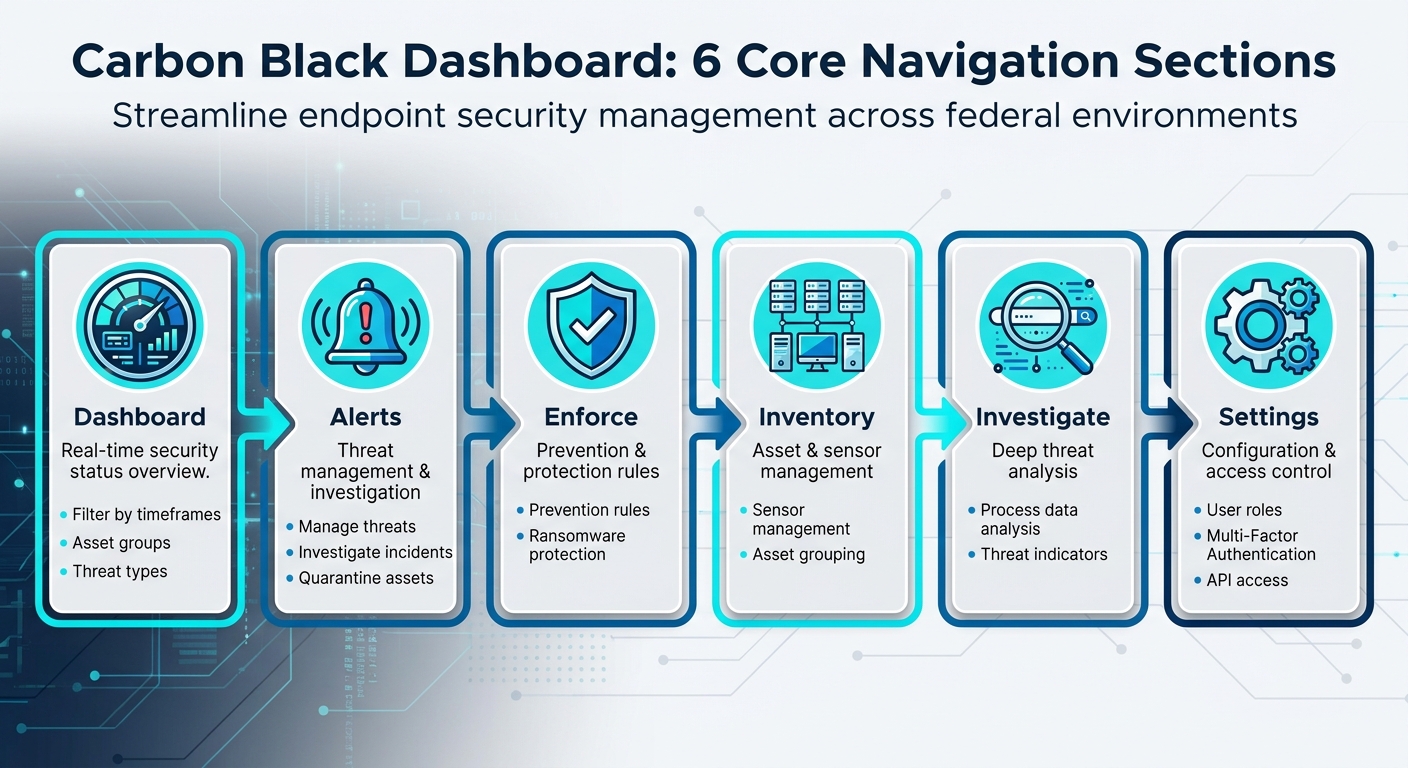
Carbon Black Dashboard Navigation: 6 Core Sections for Endpoint Security Management
The Carbon Black Cloud dashboard brings all your endpoint monitoring efforts into one place, offering customizable widgets for real-time metrics, alerts, and reports [8][10]. With the "Configure your Dashboard" feature, you can adjust the layout to focus on what matters most to your security goals. For professionals managing sensitive environments, widgets like "Alerts by Severity" and "Sensor Health" can be particularly useful for keeping an eye on critical systems [8][10].
How to Navigate the Carbon Black Dashboard
The dashboard is divided into six main sections, each designed to streamline specific aspects of your security management:
- Dashboard: Offers a real-time overview of your security status. You can filter data by timeframes, asset groups, or threat types for a focused view [8][9].
- Alerts: Helps you manage and investigate threats, with options to quarantine affected assets [8].
- Enforce: Focuses on managing prevention rules and protecting against ransomware [8].
- Inventory: Handles sensor management and organizes assets into groups [8].
- Investigate: Allows for in-depth analysis of process data and threat indicators [8].
- Settings: Provides tools to manage user roles, enable Multi-Factor Authentication, and configure API access for integrations [8].
Once you’ve familiarized yourself with these sections, you can start tailoring policies to meet your security needs.
Setting Up Policies for Cleared Environments
Carbon Black Cloud uses a policy-ranking system to control how assets behave under different security settings. It offers three predefined templates:
- Monitored: Logs events without enforcement, allowing you to observe activity.
- Standard: Blocks known malware and risky operations, providing a balanced level of protection.
- Advanced: Applies the strictest restrictions, including blocking system utilities.
To ensure smooth implementation, begin by testing sensors under the Standard policy for at least 72 hours with a small group of assets. This helps establish a baseline. Afterward, pilot the Advanced policy on select assets to confirm that legitimate applications remain unaffected [13][14]. Grouping endpoints into asset categories lets you automate policy assignments, ensuring the strictest settings are applied to sensitive systems [15]. Keep in mind that policy order matters – new policies are added to the bottom of the list, so you’ll need to rearrange them manually to ensure they’re applied correctly [14].
Connecting Carbon Black with Other Security Tools
After refining your dashboard and policies, you can integrate Carbon Black with other security platforms to enhance your overall strategy. The Data Forwarder is key to streaming endpoint events and alerts to tools like SIEM, SOAR, or Data Lake solutions [16]. For environments with limited connectivity, the Sensor Gateway acts as an on-premises bridge, simplifying communication between sensors and the Carbon Black Cloud while addressing firewall requirements [11][12][18].
SIEM tools like Splunk and IBM QRadar can be integrated to display endpoint telemetry alongside other security data in unified dashboards [17][19]. The Data Forwarder is particularly suited for large-scale environments, as it handles high data volumes more efficiently than traditional API polling [17]. You can also automate responses by linking SIEM alerts to SOAR playbooks, enabling actions like quarantining devices or initiating Live Response to reduce response times [16].
Threat Hunting and Incident Response with Carbon Black
Once your dashboards and policies are set up, it’s time to focus on active threat hunting and quick incident response. Carbon Black’s Endpoint Detection and Response (EDR) tools are designed to help you investigate suspicious activities early, preventing them from escalating into major security breaches. In high-stakes environments where adversaries are more advanced, these features play a critical role in maintaining strong defenses.
Threat Hunting with Carbon Black EDR
Carbon Black EDR allows you to conduct in-depth investigations using advanced search queries tailored to specific fields. For instance, you can use cmdline to identify obfuscated scripts, path to locate persistence mechanisms in temporary directories, or md5/sha256 to search for known malicious files. The Threat Tracer feature visually maps out attack chains, starting from a single indicator and connecting it to the broader attack sequence.
Live Response and Endpoint Isolation Methods
When a compromised endpoint is identified, network isolation stops lateral movement by restricting connectivity while keeping the sensor communication intact [20]. This ensures you can still access the device for Live Response sessions, enabling forensic analysis and remediation without risking further spread [20]. Live Response provides a remote command-line interface for tasks like modifying the registry, retrieving files, or terminating processes [22][24]. You can also use process banning to block specific MD5 or SHA256 hashes across all devices or within specific sensor groups, halting the spread of identified threats [21].
Before an incident occurs, confirm that Live Response is enabled in the sensor policy or in cb.conf, as it may be disabled by default in some setups [22][24]. Additionally, configure isolation exclusions to ensure critical business communications and management tools remain operational even when a device is quarantined [21][23]. After completing your investigation, always manually end Live Response sessions to maintain security hygiene [22]. Finally, analyze alerts generated during isolation to refine your understanding of potential threats.
Alert Analysis and Baseline Creation
Carbon Black categorizes security data into Events (individual actions), Observations (potentially suspicious activities), and Alerts (clear indicators of threats or policy violations) [25]. To prioritize your response, sort alerts by their severity score, which ranges from 1 to 10 [25]. Use the Threat ID to group related alerts across multiple devices and assess the scope of a specific threat [25].
The triage process involves reviewing alert details, running queries for related observations, and marking alerts as either True Positives or False Positives, which helps improve future detection accuracy [25][26]. Leverage "Building Blocks" to create custom filters that refine detection rules – for example, excluding trusted processes or focusing on activities in temporary directories [27]. Regularly review "Recommendations" from Carbon Black Cloud and add "Core Prevention Process Exclusions" for legitimate applications that cause false positives, directly from the Alerts page [26].
Advancing Your Career with Carbon Black Skills
Expanding your technical skill set with VMware Carbon Black expertise can significantly boost your career in the cleared cybersecurity sector. Let’s explore how these skills align with job market demands and the resources available to help you succeed.
Job Market Demand for Carbon Black Skills
Mastering VMware Carbon Black opens doors to specialized roles in cleared cybersecurity. With certifications like FedRAMP High and NIAP Common Criteria, Carbon Black is a key requirement for many federal positions [1][3]. For example, job listings for roles such as Carbon Black Endpoint Security Engineer often specify active TS/SCI with CI Poly and direct experience with the toolset [28].
"VMware Carbon Black is all about maximizing the effectiveness of cyber practitioners." – Garrett Lee, Director of Strategic Federal Programs, VMware Carbon Black [2]
Employers are looking for professionals skilled in the full Carbon Black suite – Cloud, App Control, and EDR – and capable of working across physical, virtual, and multi-cloud environments. These roles typically require certifications like DoD 8570 IAT Level II and CSSP Infrastructure Support, paired with specialized Carbon Black experience [28]. The ability to handle tasks like surgical remediation and advanced threat hunting without re-imaging systems makes these practitioners indispensable in Security Operations Centers (SOCs) [2]. This growing demand highlights the importance of using platforms like Cleared Cyber Security Jobs to focus your career advancement efforts.
Using Cleared Cyber Security Jobs for Career Development
Cleared Cyber Security Jobs can be a powerful tool for finding positions that emphasize Carbon Black expertise. Use features like targeted resume uploads and job alerts to streamline your search. Filtering by titles such as "Carbon Black Endpoint Security Engineer" helps you zero in on roles where your tool-specific skills stand out. By uploading your resume, you make it easier for employers seeking candidates with 2-5 years of Carbon Black experience to find you.
To stand out, tailor your profile to showcase key qualifications like migration experience across diverse environments and scripting abilities in Python or PowerShell – skills often required for senior-level roles [28]. Many cleared employers also support ongoing professional development, offering perks like tuition reimbursement and funding for certifications to help you stay up-to-date with the latest tools [28]. Additionally, participating in job fairs hosted on the platform can connect you directly with hiring managers from defense contractors and federal agencies.
Keeping Up with Carbon Black Updates
Since Broadcom acquired VMware, staying informed about updates is essential. Bookmark Broadcom’s "Secure Carbon Black Cloud Updates" page and check it regularly to ensure your endpoint security policies align with the latest recommendations [29]. Monitoring the "Carbon Black Cloud Updates" category helps you stay ahead of vendor changes and emerging threats.
Many cleared positions require on-call rotations for after-hours support, so being proactive about patches and updates is vital [28]. Configure Broadcom’s Privacy Preference Center to receive tailored notifications about updates and training opportunities relevant to your work. Keeping current with Carbon Black developments not only sharpens your technical skills but also boosts your professional value in this competitive field.
Conclusion: Your Path in Cleared Endpoint Security
Becoming proficient in VMware Carbon Black can position you as a standout professional in federal cybersecurity. This platform is a key player in fulfilling Continuous Diagnostics and Mitigation (CDM) requirements, particularly in areas such as Software Asset Management (SWAM) and endpoint visibility [30].
What sets successful professionals apart in this field isn’t just knowing how to navigate the tools – it’s adopting a threat-hunter mindset. This perspective allows for precise remediation and proactive threat hunting, leveraging unfiltered data to address threats effectively. It’s a capability that many government agencies are still striving to develop [30].
Certifications and ongoing skill development are essential for advancing your career. Start by earning the Carbon Black Endpoint Standard Certification, and make it a habit to stay updated on changes through the CBC User Guide. Automation can also be a game-changer, helping you streamline threat detection and reduce the need for manual monitoring. Tools like Threat Tracer, Live Query, and Watchlists are excellent for honing your threat-hunting expertise [31]. Additionally, staying informed through the latest Carbon Black Cloud Console release notes – such as updates from April 22, 2026 – ensures you’re equipped with cutting-edge security technology [27].
For career opportunities, explore Cleared Cyber Security Jobs to connect with employers looking for Carbon Black specialists. Search for roles like "Carbon Black Endpoint Security Engineer" and customize your profile to showcase certifications, migration experience, and scripting skills in Python or PowerShell.
FAQs
How do I set up Carbon Black for air-gapped networks?
To set up Carbon Black in an air-gapped network, you’ll need to take a few key steps to ensure everything runs smoothly.
Start by preparing an internet-connected caching server. This server will be used to download all the necessary RPM packages and their dependencies. Once you’ve gathered these files, transfer them to the air-gapped server using physical media like a USB drive or external hard disk.
Next, configure a local repository on the air-gapped server. After setting it up, clean the Yum cache to avoid conflicts, and make sure Yum is pointed to the newly created repository. This ensures the server can access the required packages without needing internet connectivity.
For threat intelligence updates, use the Airgap Feed tool. This tool allows you to export threat feeds from the connected environment and import them into the air-gapped one. To keep the system secure and up-to-date, make it a habit to regularly update both the cache files and the threat feeds. This way, you can maintain the latest protection even in an isolated setup.
What’s the fastest way to prepare for exam 5V0-93.22?
The fastest way to get ready for the VMware 5V0-93.22 exam is by diving into practice questions and exam prep materials tailored to this certification. Prioritize questions that mirror the actual exam format – this helps you pinpoint the most important topics while boosting your confidence. Additionally, reviewing the official exam objectives and leveraging adaptive learning tools can make your study process more focused and ensure you cover the essential areas effectively.
Which Carbon Black dashboards and alerts matter most in federal SOCs?
For federal Security Operations Centers (SOCs), the most important Carbon Black dashboards are those that provide endpoint visibility, focusing on details like process and application activity. These dashboards are crucial for monitoring and analyzing potential threats.
Key alerts to watch include:
- Suspicious behavior: Indicators of unusual or potentially malicious activity.
- Threat detections: Notifications of identified security risks.
- Policy violations: Alerts triggered when established security policies are breached.
To stay on top of these events, use the alert filters available on the Alerts page. These filters help prioritize critical incidents, enabling faster responses. This approach not only streamlines threat analysis but also reinforces policy enforcement in high-security environments.