

Microsoft Sentinel is a cloud-based security platform tailored for professionals in high-security sectors like government and defense. It combines advanced AI, data analysis, and automation tools to detect, investigate, and respond to threats. This guide walks you through deploying Sentinel in secure environments, setting up compliance-ready workspaces, and leveraging its tools for threat detection, hunting, and incident response. Key highlights:
- Security Clearance Requirements: Different Azure environments demand varying clearance levels, from Public Trust to Top Secret/SCI.
- Setup Essentials: Deploy Sentinel in Azure Government for compliance with FedRAMP High, DISA IL4/IL5 standards.
- Threat Detection: Use analytics rules and data connectors to monitor high-value logs in real time.
- Automation: Implement playbooks for incident response, using managed identities for secure execution.
- Skill Development: Master KQL for custom rules, optimize data ingestion, and align detections with MITRE ATT&CK techniques.
This guide is designed to help cleared professionals enhance their expertise in managing cloud security with Microsoft Sentinel.
Microsoft Sentinel Tutorial: Introduction, Capabilities, and Architecture | Sentinel Architecture
sbb-itb-bf7aa6b
Prerequisites and Environment Setup
Azure Cloud Environments Security Clearance Requirements and Impact Levels
Cleared Cloud Security Requirements
Deploying Microsoft Sentinel in a secured environment requires the right security clearance, which must be sponsored by your employer. Gaining access to government-only cloud platforms like Microsoft Azure Government involves meeting strict clearance standards, including a verified "need-to-know" for specific classified information and a favorable adjudication of loyalty, reliability, and judgment [8].
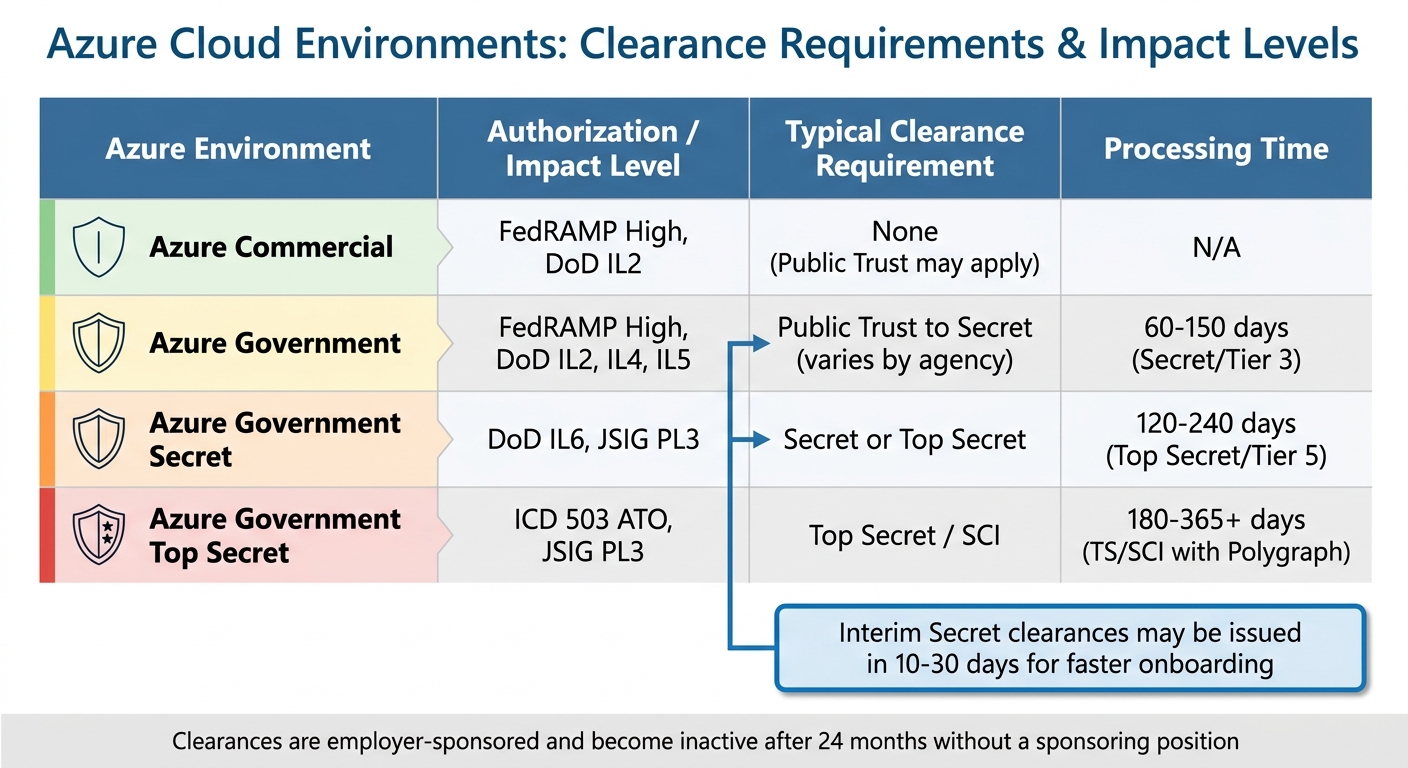
The clearance level you need depends on the Azure environment and its Impact Level (IL). For example:
- Azure Government (IL4 and IL5): Requires Public Trust or Secret clearance.
- Azure Government Secret (IL6): Requires Secret or Top Secret clearance.
- Azure Government Top Secret: Demands Top Secret/SCI clearance with additional authorizations like JSIG PL3 or ICD 503 ATO [7].
| Azure Environment | Authorization / Impact Level | Typical Clearance Requirement |
|---|---|---|
| Azure Commercial | FedRAMP High, DoD IL2 | None (Public Trust may apply) |
| Azure Government | FedRAMP High, DoD IL2, IL4, IL5 | Public Trust to Secret (varies by agency) |
| Azure Government Secret | DoD IL6, JSIG PL3 | Secret or Top Secret |
| Azure Government Top Secret | ICD 503 ATO, JSIG PL3 | Top Secret / SCI |
Processing times for clearances can vary widely:
- Secret (Tier 3): 60 to 150 days.
- Top Secret (Tier 5): 120 to 240 days.
- Top Secret/SCI with Polygraph: 180 to 365+ days due to scheduling delays [8].
For faster onboarding, Interim Secret clearances may be issued in 10 to 30 days after initial checks, allowing you to begin work on certain tasks while the full investigation continues [8].
"A clearance is tied to the sponsoring position. If you leave the job that requires it, your clearance typically becomes inactive after 24 months unless picked up by a new sponsor." – Kevin James, Cybersecurity Writer [8]
Clearances cannot be obtained independently. You must first receive a conditional job offer from a federal agency or an authorized contractor [8]. Before applying, it’s wise to review your credit reports and resolve any financial issues, as these are a common reason for clearance denial. Additionally, maintain a detailed record of foreign contacts, including names, nationalities, and relationship details, to ensure accuracy on the SF-86 form [8].
Once your clearance is confirmed, you can proceed with setting up your secure Sentinel workspace.
Setting Up Microsoft Sentinel in a Secured Workspace
When deploying Microsoft Sentinel in a cleared environment, the first step is choosing the right cloud environment. Your choice between Azure Commercial or Azure Government depends on the Impact Level of the data you’ll handle. For instance:
- Azure Government supports DISA IL4 and IL5.
- Azure Commercial supports DISA IL2 [1].
If your data comes from Office 365 GCC High or DoD, you must use Azure Government to remain compliant [1].
After selecting your environment, follow these steps to set up your workspace securely:
- Secure Necessary Licenses and Subscriptions
Ensure you have a Microsoft Entra ID license, a tenant, and an Azure subscription with valid payment methods [9]. Your Sentinel deployment will rely on a Log Analytics workspace. Avoid applying resource locks to this workspace and use supported pricing tiers like pay-as-you-go or commitment tiers [9]. Organize resources into a dedicated group to simplify permissions and minimize access risks [9]. - Implement Identity and Access Controls
Use Azure Role-Based Access Control (RBAC) to assign permissions. For new subscriptions, assign roles like Owner or Contributor, but stick to least-privileged access by applying roles at the resource group level [9]. Some connectors, such as the Microsoft 365 connector, require roles like Global Administrator or Security Administrator [3][11]. Enforce Multi-Factor Authentication (MFA) for all privileged accounts and enable Privileged Identity Management (PIM) for temporary role assignments [6]. - Enable Customer-Managed Keys (CMK) for High-Compliance Environments
For added encryption security, configure CMK on a dedicated Log Analytics cluster with at least a 100 GB/day commitment tier before onboarding Sentinel [10]. Note that CMK-enabled workspaces can only be onboarded via REST API or Azure CLI – not through the Azure portal or ARM templates [10]. Sentinel will honor key revocation within one hour, stopping data ingestion and incident creation until access is restored [10]. - Integrate Non-Microsoft Cloud Data Securely
To connect data from platforms like AWS GovCloud, use federated web identity providers (e.g., OpenID Connect) for secure, credential-free authentication [1][12]. Install Windows PowerShell (not PowerShell 7.x) and the latest Azure (Az) module [13][12]. For AWS integration, configure the AWS CLI and execute theConfigureAwsConnector.ps1script to automate the creation of S3 buckets and SQS queues for secure data ingestion [12]. Temporarily set PowerShell’s execution policy toUnrestrictedwhen running configuration scripts [12]. - Verify Microsoft 365 Audit Logging
Before connecting Microsoft 365 logs, ensure that unified audit logging is enabled in the Microsoft Purview compliance portal [11]. After deployment, use the "Microsoft Sentinel Cost" workbook to monitor ingestion and retention data, helping you stay within budget [3].
It’s important to note that network security perimeters are not supported for Log Analytics workspaces enabled for Microsoft Sentinel. Enabling a perimeter will automatically disable analytic rules [9].
Microsoft Sentinel Features for Threat Detection and Response
Configuring Data Connectors for Cleared Data Sources
Microsoft Sentinel relies on data connectors to pull in security logs from approved infrastructures. Many of these connectors are available through the Content Hub, offering ready-made analytics rules and playbooks to simplify setup while aligning with security protocols [14][15].
For environments like on-premises systems or Linux-based sources, the Azure Monitor Agent (AMA) is your go-to tool for streaming Syslog and Common Event Format (CEF) data. This agent operates over port 443, so ensure your network security team adjusts firewall rules to allow this traffic [15][18]. Meanwhile, Microsoft services such as Entra ID and Defender XDR bypass the need for agents by using direct service-to-service integration for seamless data ingestion [15].
When integrating AWS GovCloud with Sentinel in Azure Government, it’s best to use OIDC-based authentication to assume IAM roles instead of static access keys. Pair this with Microsoft Entra ID for federated authentication, which offers a more secure alternative to static credentials.
For better cost management and compliance, divide your data ingestion between two tiers:
- Analytics tier: Ideal for real-time detection. Use this for high-value logs such as Entra ID sign-ins, EDR alerts, and firewall threats.
- Data Lake tier: Suitable for long-term storage and forensic analysis. Logs with high volume but lower criticality, like DNS logs, VPC Flow logs, and raw EDR data, can be routed here [14][16].
Keep in mind that data sent to the Data Lake tier may take 90 to 120 minutes to appear [14].
| Log Source Type | Typical Volume | Value for Real-time Detection | Ingest to Data Lake |
|---|---|---|---|
| Identity (Entra ID, Okta) | Medium | High | No (Analytics Tier) |
| Firewall Threat/IPS | High | High | No (Analytics Tier) |
| DNS Logs | High | High | Yes |
| VPC Flow Logs | High | High | Yes |
| Raw EDR Data | High | High | Yes |
| Office 365 Logs | Medium | Medium | No (Analytics Tier) |
| Database Audit Tools | Medium | High | Yes |
Once connectors are configured, monitor the "Data received" graph on the connector page to confirm successful streaming [14][17]. With your data sources in place, you can move on to building analytics rules and automation playbooks for better threat response.
Using Analytics Rules and Automation Playbooks
Analytics rules are the backbone of Sentinel’s threat detection capabilities. These rules are crafted using Kusto Query Language (KQL) and must include the TimeGenerated column to define the lookback period [19]. Scheduled rules allow up to a 14-day lookback, but queries must stay within a 10,000-character limit. If you hit this limit, consider moving static lists to watchlists or custom functions [19][22].
For comprehensive threat coverage, map each rule to MITRE ATT&CK tactics and align rule outputs to entities like accounts, IP addresses, or hosts. This ensures better correlation during investigations and meets strict compliance standards. Each rule template supports up to 10 entity mappings and 20 custom details [20][22].
In cleared environments, prioritize Near-Real-Time (NRT) rules for detecting critical threats with minimal delay – they run at 1-minute intervals [21][23]. For deeper analysis, use Scheduled rules, and for behavioral baselining, deploy Anomaly rules. When tweaking anomaly rules, test changes in "Flighting" mode while keeping the original in production to compare results [24].
To reduce alert fatigue, enable alert grouping to consolidate related alerts into a single incident. A single incident can group up to 150 similar alerts. Use the "Test with current data" feature in the analytics rule wizard to preview how many alerts a rule would have generated over its last 50 runs [19].
Building on detection, automation playbooks simplify incident response. These playbooks, powered by Azure Logic Apps, can be tailored for cleared operations. Start with pre-built options from the Microsoft Sentinel Content Hub, like the "Sentinel SOAR Essentials Solution" for basic notification and incident management templates [25].
For advanced workflows, consider bi-directional ticketing sync playbooks to synchronize Sentinel incidents with systems like ServiceNow, preserving audit trails [25][27]. In high-security settings, use human-in-the-loop (HITL) orchestration playbooks to send interactive notifications via Microsoft Teams or email. This allows senior admins to approve sensitive actions before execution [25][26].
Common remediation playbooks include actions like disabling compromised Entra ID users, resetting passwords, blocking malicious IPs in Azure Firewall, or isolating compromised hosts through Microsoft Defender for Endpoint [25][26]. For secure execution, use Managed Identities (System-assigned or User-assigned) to authenticate playbook connections without managing credentials [29].
Finally, assign the "Microsoft Sentinel Automation Contributor" role to the resource group housing your playbooks. This is essential for granting automation rules the permissions they need to run. Keep in mind that there’s a limit of 2,000 role assignments per subscription, so plan accordingly when deploying managed identities [26][28][29].
Use Cases for Cleared Cybersecurity Operations
Threat Hunting in Restricted Environments
A hypothesis-driven approach is essential for threat hunting in restricted environments. Start by identifying gaps in MITRE ATT&CK coverage and tracking emerging campaign patterns, such as Log4J exploits, to validate suspicions before they escalate into incidents [30].
Focus on high-value assets and monitor privileged accounts for unusual sign-ins that could signal credential theft [33]. In Azure environments, keep an eye on newly created or modified Service Principals to detect potential persistence or privilege escalation [33]. For data exfiltration, look for anomalies in Azure Key Vault access patterns or unusual "GetFile" operations in Azure Storage and Data Lakes [13].
Bookmark suspicious log entries in Microsoft Sentinel to capture entity identifiers and investigative notes. These bookmarks can either be escalated into incidents or retained as evidence for compliance audits [30][31]. If a hunting query consistently identifies threats, convert it into a scheduled analytics rule to automate detection and reduce manual effort [5][33].
For more advanced threat detection, tools like Jupyter Notebooks paired with the IsolationForest algorithm can uncover subtle "living off the land" attacks [32][33].
Once threats are accurately identified, a well-structured incident response plan becomes critical to ensure compliance and maintain security.
Incident Response for Compliance Standards
Effective incident response in cleared operations must balance security and compliance requirements. Microsoft Sentinel simplifies this process with built-in compliance support. Azure Government holds FedRAMP High, DISA IL4, and DISA IL5 certifications, making it a reliable choice for handling sensitive operations [1]. This compliance framework extends to AWS GovCloud integrations, creating a unified security posture across multi-cloud setups.
A real-world example from February 2026 shows how David Udeme Inyang, a Security Analyst at Finsecure Inc., managed an advanced persistent threat (APT) and ransomware attack using Microsoft Sentinel. By analyzing Azure AD Sign-in logs, Windows SecurityEvent logs, and Defender for Endpoint telemetry, the team identified unauthorized RDP access and malicious PowerShell activity. Their efforts resulted in a Mean Time to Detect (MTTD) of 30 minutes and a Mean Time to Contain (MTTC) of 2.5 hours, successfully containing 70% of systems before encryption and preventing significant PII exfiltration [36].
"In modern cloud environments, identity is the primary attack surface. Advanced threats no longer rely solely on malware – they exploit credentials, misconfigurations, and visibility gaps." – David Udeme Inyang, Security Analyst, Finsecure Inc. [36]
To streamline incident response, trigger compliance workflows using Logic Apps. These playbooks can enrich incident data by pulling user details from Entra ID or device status from Intune, saving valuable time during triage [35]. For threats not captured in logs, such as SMS phishing reported by employees, manually create incidents in Sentinel to maintain a centralized compliance record [34]. Always align custom KQL analytics rules with MITRE techniques to simplify compliance reporting and highlight detection gaps [36][37].
Finally, use Azure Policy initiatives to enforce diagnostic compliance across all resources. This ensures that all IaaS and PaaS resources automatically route logs to the designated Sentinel workspace, maintaining the continuous audit trail required for cleared environments [13].
Best Practices for Operations and Skill Development
Monitoring and Maintaining Data Connectors
Performing daily health checks is essential to avoid gaps in your security setup. Use the "Data Collection Health Monitoring" workbook from the Content Hub to keep an eye on Events Per Second (EPS) rates and identify any anomalies in data ingestion [38][39]. Activate the Sentinel health feature in your settings to populate the SentinelHealth table, which records data fetch status changes and failure summaries at a low cost [38][43].
Set up Azure Monitor alert rules using KQL queries to get instant notifications when connectors change from "Success" to "Failure" [38][39]. To minimize unnecessary alerts, the system delays logging transient issues like service throttling for 60 minutes [38][39]. When creating analytics rules for health-related issues, add the prefix "[HealthIssue]" to incident titles so that SOC engineers can easily differentiate maintenance tasks from active security threats [43].
"Users are still responsible for monitoring and taking action to resolve issues that arise from within the PaaS Sentinel infrastructure." – Thijs Lecomte, Security Consultant, The Collective [43]
Follow a tiered maintenance schedule for efficiency: conduct daily checks for data flow and Azure Monitor Agent connectivity, update content from the Content Hub weekly, and review user permissions and retention settings monthly [40]. Before escalating connector issues, confirm that Role-Based Access Control (RBAC) is correctly configured for service principals and agent identities [4]. For compliance, use the Microsoft Sentinel data lake tier, which offers log storage for up to 12 years with an ingestion window of 90 to 120 minutes [42].
These practices ensure smoother operations and better groundwork for automation and access management.
Managing Automation and Permissions
Using managed identities is a smart way to avoid hardcoded credentials and reduce the need for multiple service accounts. Transition all playbooks to system-assigned managed identities to simplify authentication with Azure services like Key Vault and Storage [44][27]. This approach not only makes troubleshooting easier but also strengthens security.
Replace deprecated analytics rule-based triggers with automation rules to handle complex response workflows [45][48]. Automation rules allow you to set execution priorities using sequential order numbers [45]. Monitor the SentinelHealth table for events like "Automation rule run" and "Playbook was triggered" to track successes and failures in real time [46].
Assign the Microsoft Sentinel Playbook Operator role to security analysts who need to manually execute playbooks without editing permissions [47][48]. Ensure the Microsoft Sentinel service account has the Microsoft Sentinel Automation Contributor role on the resource group containing playbooks; otherwise, automation rules may fail [47][48]. If a playbook is grayed out in an automation rule, use the "Manage playbook permissions" link to check access settings [45][48].
Enable Azure Logic Apps diagnostics to log workflow start and end events in the AzureDiagnostics table, creating a clear link between Sentinel triggers and playbook actions [46]. Perform monthly audits of user permissions and remove inactive accounts to maintain a least-privilege access model [40].
By managing automation tools and permissions effectively, you can improve operational security and develop valuable expertise.
Using Cleared Cyber Security Jobs for Career Growth
Strong operational practices like daily incident triage and health monitoring can help cleared professionals advance in cloud security roles. Cleared Cyber Security Jobs provides tailored resources for professionals with security clearances, including job alerts, career resources, and job fairs focused on cybersecurity opportunities. Uploading your resume to their database connects you with direct-hire employers who value skills in Microsoft Sentinel and cloud security.
Daily tasks like incident triage, threat hunting, and connector health checks build operational expertise [40]. Mastery of Kusto Query Language (KQL) is crucial for tasks such as threat hunting, creating custom analytics rules, and querying the SentinelHealth table for data ingestion issues [38][2]. Use playbook templates from the Content Hub to implement best practices for incident enrichment and ticketing synchronization [41][27].
Prepare for the March 31, 2027 deadline, when Microsoft Sentinel support in the Azure portal ends [41][2]. Transition operations to the unified Microsoft Defender portal to ensure continuity. Understanding the architecture of the Microsoft Sentinel data lake, including its analytics and long-term storage tiers, is key to optimizing both performance and cost in cleared environments [2][42].
Take advantage of the platform’s career advice and certification resources to stay ahead of evolving threats and compliance standards. Regularly engaging with the Content Hub for new tools and solutions will help you develop skills that are in high demand among employers in the cleared community [40][41].
Conclusion and Next Steps
Microsoft Sentinel is built with a compliance-first approach, meeting the stringent requirements of cleared environments. Its features provide a unified, secure solution tailored to the needs of cleared cybersecurity professionals. With its ability to ingest data from multiple clouds – including AWS GovCloud and Google Cloud Platform – it sets a strong foundation for building a robust Security Operations Center (SOC) [1].
Take your detection engineering skills to the next level with Kusto Query Language (KQL). In March 2026, Sagar Timalsina demonstrated this by creating a cloud-native detection pipeline with Microsoft Sentinel. This solution identified brute-force attacks by correlating Windows Security Event IDs 4625 (failed login) and 4624 (successful login). Using the Logs Ingestion API for custom telemetry and integrating Logic App playbooks, the pipeline automated incident enrichment while mapping detections to MITRE ATT&CK techniques T1110 and T1078 [37].
"Custom telemetry ingestion provides flexibility… Correlation-based detection improves signal quality… Automation improves SOC efficiency." – Sagar Timalsina, Cybersecurity Enthusiast [37]
This example underscores the value of incorporating advanced detection methods into your security strategy.
For professionals with security clearances, Cleared Cyber Security Jobs offers tailored resources like job alerts, career advice, and cybersecurity-focused job fairs. The platform also provides certification guidance and professional development tools, specifically designed to support the cleared community.
Expand your expertise further with hands-on labs, custom ingestion projects, and SOAR automation playbooks [37][49]. Gaining proficiency in IAM roles such as "Microsoft Sentinel Automation Contributor" and aligning your detections with the MITRE ATT&CK framework can help you secure in-demand roles in cleared cybersecurity operations [37]. By embracing these advanced practices, you’ll strengthen your position in the field and enhance your contributions to cleared cybersecurity efforts.
FAQs
Which Azure environment should I use for my data’s Impact Level?
For data with specific security requirements, selecting the appropriate Azure environment is crucial. For IL5 data – which includes sensitive government or defense information – Azure Government regions are the go-to choice. These regions are authorized for IL5 workloads and meet stringent Department of Defense (DoD) security standards.
For data classified at IL2 or IL4, you might consider either Azure Government or Azure Commercial, depending on your particular security needs. Regardless of the choice, it’s essential to ensure compliance with relevant standards like FedRAMP or DoD IL4/IL5 to maintain proper data security and regulatory adherence.
How do I securely connect GCC High/DoD and AWS GovCloud logs?
To securely link GCC High/DoD and AWS GovCloud logs to Microsoft Sentinel, it’s essential to use the right connectors and configurations tailored to these environments.
For AWS GovCloud, set up S3 buckets, configure IAM roles, and use OIDC authentication while ensuring permissions are correctly assigned.
For GCC High/DoD, rely on FedRAMP-compliant connectors, configure permissions appropriately, and authenticate using Azure AD and IAM roles.
These steps help maintain secure log transfers while adhering to government compliance requirements.
How can I cut Sentinel costs without losing real-time detections?
You can cut down on Microsoft Sentinel costs without losing real-time detection capabilities by leveraging Data Collection Rules (DCRs). These allow you to filter out less critical log data before it’s ingested, effectively reducing data volume and storage expenses.
To further manage costs, make it a habit to review and fine-tune your ingestion volumes, commitment tiers, and storage settings. This way, you can ensure your expenses stay optimized while keeping your detection systems fully operational.