

ArcSight is a critical tool for cleared SOC analysts managing classified environments. It centralizes log collection, event correlation, and threat detection, ensuring security events are identified and addressed in real time. This guide covers key skills like configuring log collection, creating correlation rules, and using ArcSight’s components effectively.
Key Takeaways:
- Core Components: SmartConnectors (log collection and normalization), ArcSight ESM (real-time event correlation), and Logger (secure log storage).
- Log Management: Use SmartConnectors for encrypted log collection and FlexConnectors for custom log parsing. Optimize by filtering unnecessary logs.
- Event Correlation: Build rules to detect patterns like log-clearing (Windows Event ID 1102) or privilege escalation. Use Active Lists to track trends over time.
- Incident Response: Leverage ArcSight SOAR for automated triage, case management, and swift remediation.
- Compliance: Ensure tamper-proof log storage with WORM solutions and follow regulatory standards like PCI-DSS and HIPAA.
- Integration: Connect ArcSight with tools like Active Directory for enriched event data and threat intelligence feeds for enhanced detection.
ArcSight’s capabilities help SOC analysts detect threats, maintain compliance, and safeguard sensitive systems. This guide equips you with practical tips to maximize its potential.
ArcSight SIEM Architecture Explained with Real-World Use Case
sbb-itb-bf7aa6b
ArcSight Components and Architecture
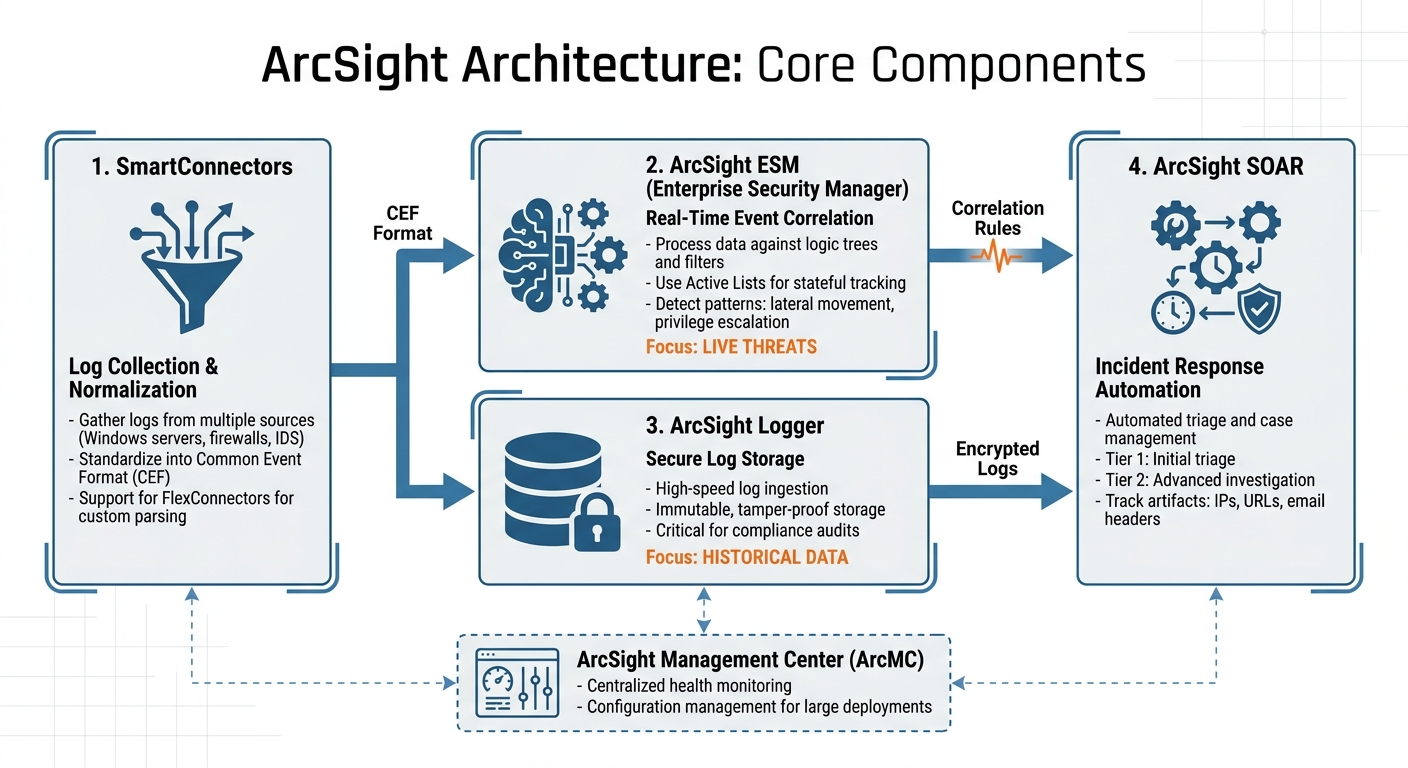
ArcSight Architecture: 4 Core Components for SOC Security Monitoring
Main Components of ArcSight
ArcSight operates through four key components, each playing a vital role in security monitoring. First, SmartConnectors gather logs from a variety of sources – Windows servers, firewalls, intrusion detection systems, and more. These logs, often in different formats, are standardized into Common Event Format (CEF) to enable consistent analysis across your entire system.
The ArcSight ESM (Enterprise Security Manager) handles real-time event correlation. It processes incoming data against logic trees, filters, and Active Lists – dynamic collections that monitor attributes over time, like tracking users who access sensitive systems. This stateful tracking is essential for spotting suspicious activities, such as lateral movement or privilege escalation, especially in sensitive environments. Meanwhile, ArcSight Logger ensures high-speed log ingestion and secure, immutable storage. This feature is critical for maintaining the integrity of evidence, particularly for legal and compliance audits in sectors like government and defense.
For larger deployments, ArcSight Management Center (ArcMC) simplifies the management of SmartConnectors by centralizing health monitoring and configuration updates through a single interface. Additionally, modern setups often include built-in SOAR (Security Orchestration, Automation, and Response) tools. These tools streamline incident response by automating triage and workflows, helping your team respond to threats faster. Together, these components create a cohesive system tailored for the complex demands of a cleared SOC.
ArcSight’s Role in SOC Operations
With these components working in unison, ArcSight serves as the backbone of cleared SOCs. The ESM continuously monitors event streams, applying correlation rules to detect suspicious patterns and trigger immediate alerts. This real-time detection is invaluable for intercepting attackers before they can erase critical forensic evidence.
Logger complements ESM by adhering to strict retention policies required in classified environments. Its immutable storage capabilities allow for incident analysis even months after the fact, ensuring forensic evidence remains intact and reliable. The division of responsibilities is clear: ESM focuses on live threats, while Logger ensures historical data is preserved for compliance reviews and in-depth investigations.
This separation of duties is especially important in air-gapped environments, where external support may not be an option. In such cases, understanding whether an issue stems from ingestion, storage, or correlation logic can be the key to resolving visibility gaps effectively.
Log Management and Event Correlation Skills
Log Collection and Management
Accurate log collection is a must-have skill for cleared SOC analysts. Start by deploying SmartConnectors as services on either Windows or Linux systems, ensuring they’re set to auto-start after any system reboot. In cleared environments, configure these connectors to use "ArcSight Manager (encrypted)" as the destination. This setup is crucial for maintaining your Authority to Operate (ATO) and meeting federal auditing standards.
When installing, make sure to select the "Import Certificate from your ArcSight ESM" option. This ensures a trusted and encrypted connection. For larger Windows environments, consider using Windows Event Forwarding (WEF). WEF allows you to collect logs from multiple machines at a central point before sending them to ArcSight, which minimizes the number of individual connectors you need to manage.
FlexConnectors play a key role in normalizing logs into the Common Event Format (CEF). This is achieved using Parser and Categorizer files, which map incoming data to ArcSight’s schema. Fields like source IP, username, and Event ID are standardized during this process. For Windows systems, Parser files should be placed in OS-specific directories under $ARCSIGHT_HOME, and the SmartConnector service must be restarted to apply changes. This level of precision is essential in cleared environments to meet strict auditing standards.
To optimize storage and reduce unnecessary noise, configure connectors to collect only the logs you actually need. For instance, if you’re monitoring a specific application suite, select only the "Application" log type during setup instead of gathering all event types. You can verify proper event receipt and parsing by monitoring Active Channels in the ArcSight Console. Once logs are collected and normalized, the next step is to turn them into actionable intelligence using ArcSight’s correlation rules.
Event Correlation with ArcSight ESM
Once the logs are properly collected, correlation rules transform raw data into actionable insights. These rules are designed to identify patterns of related events. For example, a successful login from an unusual IP address followed by Event ID 1102 (audit log cleared) could signal malicious activity. ArcSight’s stateful tracking through Active Lists is especially useful here, as it allows you to monitor attributes over time and detect trends like lateral movement or privilege escalation.
In cleared SOCs, it’s important to strike a balance between sensitivity and operational practicality. Use whitelists for authorized administrators and account for scheduled maintenance windows in your correlation rules to minimize false positives and reduce alert fatigue. ArcSight’s identity and asset correlation features help distinguish routine administrative actions from suspicious behavior. For example, while clearing logs during scheduled maintenance might be normal for a domain admin, the same action by a standard user account raises immediate red flags.
"The integrity of security logs is crucial because these logs are the primary evidence used to detect and investigate security breaches." – ExamCollection [5]
Create rules to detect "logging silence" – a sudden drop in log volume that could indicate an attacker has disabled logging services or cleared logs. For Windows environments, focus on Event IDs like 1102 (log cleared), 4624 (successful login), and 4625 (failed login). On Linux systems, monitor for rsyslog/auditd restarts, sudo command usage, and changes to shell history. Regulatory frameworks such as PCI-DSS, HIPAA, and GDPR require detailed security logs for accountability, so your correlation logic must not only catch threats but also support compliance requirements effectively.
Threat Detection and Incident Response
Threat Detection with Rules and Dashboards
Creating effective detection rules tailored to your organization’s specific needs is key. ArcSight allows you to configure detection logic through its graphical interfaces for Rule and Test Conditions. To make tracking seamless across multiple data sources, it’s essential to map entity types like user accounts and computer names. For example, you can set a rule to trigger after detecting five failed login attempts from the same IP address within a 10-minute window. Be sure to associate each rule with the appropriate data source – such as CEF-formatted firewall logs – and review them regularly. This ensures outdated rules (inactive for 6–12 months) are adjusted or removed, and low-value alerts are minimized [6].
When a high-fidelity rule is triggered, having a swift and structured incident response plan in place is critical.
Incident Response with ArcSight SOAR
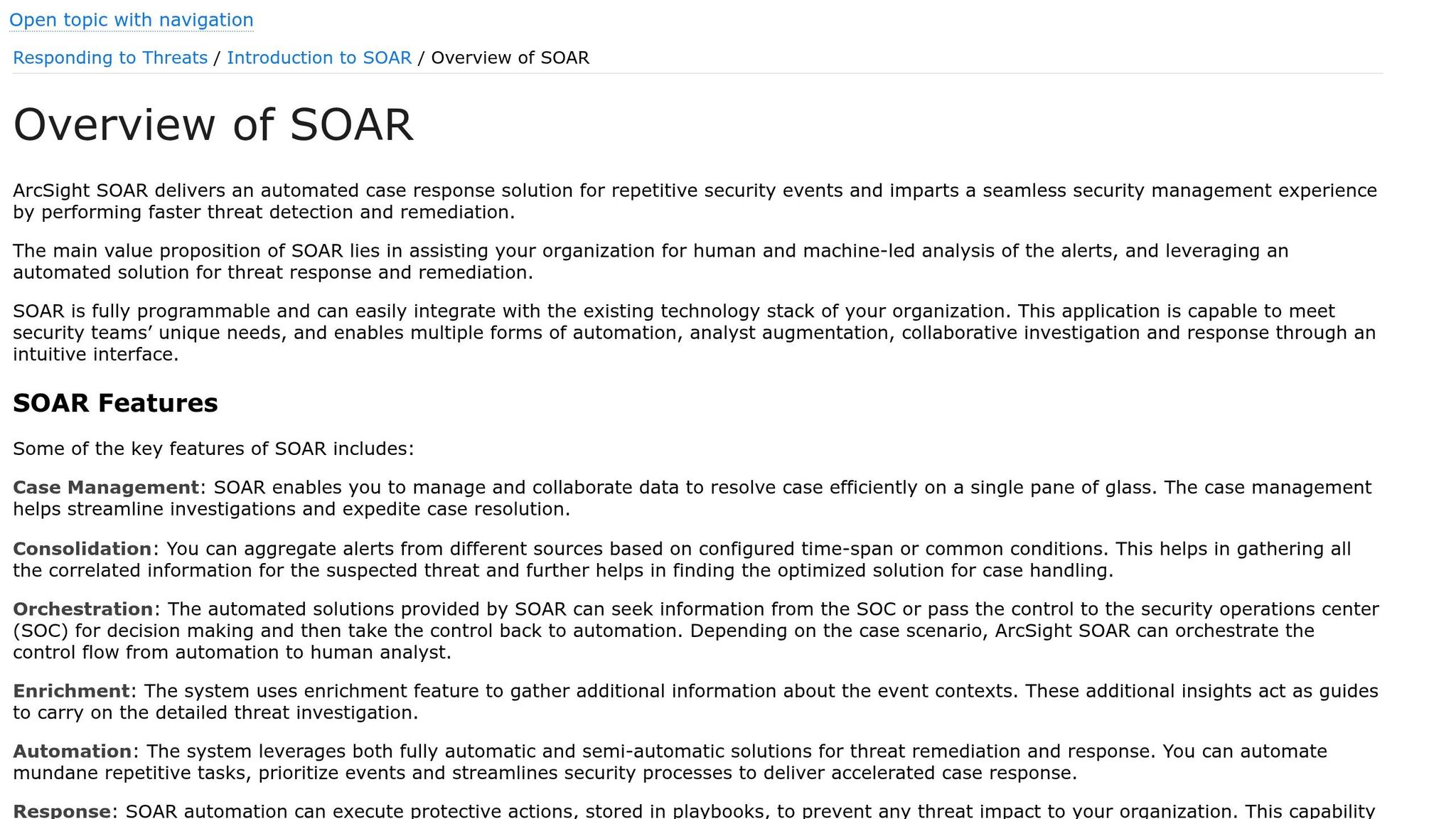
Refined detection rules feed directly into ArcSight’s SOAR platform, enabling quick case management and remediation. The platform organizes its interface into tiers: Tier 1 focuses on initial triage by providing essential context, while Tier 2 offers deeper insights for advanced investigations [9]. New cases are automatically enriched with threat intelligence, speeding up the remediation process [7][9]. Analysts can track key artifacts – such as IP addresses, URLs, and email headers – giving them a holistic view of the attack. From the case interface, response actions like blocking IPs or sending notifications can be executed. For high-risk actions in sensitive environments, approval gates can be set up to require supervisor sign-off. Additionally, for automated actions like blocking a host, setting a rollback interval is a good practice to allow for quick reversals if disruptions occur [9].
SOC teams face an overwhelming volume of alerts daily – about 4,500 on average – with 50%–99% being false positives and up to 67% ignored entirely [8]. However, organizations utilizing AI-driven automation have seen their mean time to respond (MTTR) drop from 5.7 days to just 1.8 days – a 68% improvement [8]. For environments with strict compliance needs, configuring SOAR settings like the DataRetentionMaxAge parameter can help automate case cleanup while maintaining audit trails [9].
Configuring ArcSight for Cleared Environments
Security Compliance and Auditing
In cleared environments, ensuring that logs are tamper-proof and traceable is non-negotiable. To achieve this, utilize WORM (Write Once, Read Many) or immutable storage solutions. These systems prevent any modifications to logs after they’ve been ingested – even by privileged users [3]. Your log retention policies should strictly adhere to the specific regulatory frameworks you operate under, whether it’s PCI-DSS, HIPAA, or federal compliance standards [3].
Set up correlation rules to catch critical events. For Windows systems, monitor Event IDs like 1102 (audit log cleared), 4719 (audit policies disabled), and 4739 or 4902 (audit policy changes) [5][3]. On Linux, keep an eye on unexpected restarts of services like rsyslog or auditd, as these could signal attempts to hide activity [3]. Use dashboards to track log volume trends and identify timestamp gaps, as these "silent periods" might indicate tampering [3].
Access control is another critical layer. Restrict log management permissions to authorized personnel only, and implement independent monitoring of administrative actions to create a secondary audit trail [3]. Additionally, integrate ArcSight with ticketing systems or SNMP traps to ensure alerts about potential log tampering are escalated to your response teams immediately [3].
Once these compliance and auditing measures are in place, you can configure ArcSight to support cleared roles effectively.
ArcSight Setup for Cleared Roles
Properly placing and configuring parser and categorizer files is essential for ArcSight’s functionality. For Windows environments, ensure the parser file matches the specific OS version. For example, logs from Windows Server 2016 require the windows_2016 parser, located in $ARCSIGHT_HOMEuseragentfcpwindowsfgwindows_2016. Similarly, for Server 2012, use the windows_2012 parser [4]. If you’re working with identity management tools like Centrify, place the centrify_suite.csv categorizer in the acpcategorizercurrent directory [4].
After updating any parser or categorizer files, restart the SmartConnector service to apply the changes. On Windows, this can be done through Windows Services, while Linux users can restart via /etc/init.d [4]. These steps ensure your configuration aligns with the compliance and security protocols discussed earlier.
Next, configure your firewall to allow access through critical ArcSight ports: 22 for SSH, 8443 for the web console, 9000 for the Manager, and 7789 for data transfer [10]. Define trusted administrative groups and subnets within ArcSight, and enable identity correlation to prioritize alerts when log-clearing actions are performed by unknown or unauthorized accounts [3].
Finally, validate your setup regularly. One way to test this is by manually clearing a test audit log and verifying that Event ID 1102 is captured and displayed correctly in the ArcSight console [5].
Integration, Enrichment, and Automation
Connecting ArcSight with Other Security Tools
ArcSight works well with other security tools, making it easier to streamline operations. For example, SOAR platforms like Google SecOps can directly link with ArcSight to automate case management workflows. With this setup, ArcSight can automatically update case stages – such as INITIAL, QUEUED, CLOSED, FINAL, or FOLLOW_UP – based on specific rules, cutting down on manual tasks for analysts. This integration uses HTTPS and SSL-secured APIs for inbound communication to ArcSight ESM, while outbound reports are delivered to shared folders via SMB (Ports 139/445) or NFS (Ports 111/2049).
For bringing in threat intelligence, REST FlexConnectors (version 7.10) can pull enriched Indicators of Compromise (IOCs) from external sources like Rapid7. This includes data like domains, URLs, IP addresses, and MD5 file hashes. To optimize performance, you can configure the system to fetch only "deltas" – new IOCs added since the last update. External tools can also programmatically populate ArcSight Active Lists, enabling analysts to use these lists for real-time correlation without manual input. When setting up API access, it’s good practice to create a dedicated user group (e.g., Google_SecOps_API) with "Normal User" permissions and tailored ACLs. This ensures external tools only access the event filters they need, enhancing security and control.
Adding Context to Event Data
ArcSight’s integration features don’t just improve workflows – they also enrich raw log data for more accurate analysis. Correlating assets and identities is especially important in secure SOC environments. For instance, a log-clearing event (Windows Event ID 1102) might be treated differently if the source user is a regular employee versus an authorized administrator [3]. By integrating ArcSight with tools like Active Directory or Okta, you can automatically link IP addresses to specific users and their roles [4].
"Arcsight’s architecture is designed to provide robust log management capabilities. It collects logs continuously from a variety of sources… Once collected, logs are parsed and normalized into a common schema, which allows for consistent querying and analysis regardless of the original source." – ExamCollection [3]
To enhance process visibility, you can enable "Include command line in process creation events" (Windows Event ID 4688) through Group Policy Objects. This lets analysts see the exact commands executed during a security event [13]. Additionally, by using a .jsonparser.properties file, you can map external enrichment data – like "Last Seen" or "Source Name" – to ArcSight’s deviceCustomString fields, ensuring the data is fully searchable in the ESM console. ArcSight connectors can also assign severity levels using a 1–10 scale: 1–2 for very low, 3–4 for low, 5–6 for medium, 7–8 for high, and 9–10 for critical [11].
Workflow Automation with ArcSight
Automation plays a key role in speeding up response times and allowing analysts to focus on complex investigations. ArcSight supports automation for Active Lists, enabling tasks like automatic addition, cleanup, and retrieval of entries – essential for real-time threat containment and indicator management [14]. Background daemons also help collect Query Viewer results and manage ESM cases without manual intervention.
ArcSight can be configured to auto-generate CSV reports for extracting event IDs through connectors and for deeper API-driven analysis. In highly secure environments, "Bridge" execution is recommended for automation engines instead of cloud-based execution, ensuring tighter data flow control and compliance [14]. Automated jobs can also be set up to clean Active List entries regularly, preventing outdated data from slowing down ESM performance [14]. Integration with threat intelligence platforms allows up to 10 specific data tokens per event, mapping fields like iocType, iocValue, and enrichment into ArcSight’s custom string fields [12].
Practical Tips and Use Cases
Building on the configuration and integration techniques already mentioned, these practical tips can help you get the most out of ArcSight in cleared environments.
Tips for Using ArcSight Effectively
Filter at the source to cut down on unnecessary noise. By configuring SmartConnectors to drop events you know are harmless before they even reach the ESM, you ensure your system focuses on actual threats. Keep an eye on connector health regularly – this helps you spot any gaps in log collection or bottlenecks early.
Fine-tune correlation rules to reduce false positives. For instance, set frequency thresholds (like more than one event within a five-minute window) and whitelist trusted administrators. Linking event data with asset metadata and identity information is also key – this helps you prioritize alerts based on the importance of the system involved. For example, a log-clearing event on a domain controller should raise immediate flags, while the same action on a standard workstation might just be routine maintenance.
If you’re working in large environments, use Windows Event Forwarding (WEF) to simplify log collection. To capture potentially malicious activity, enable "PowerShell Script Block Logging" and "Module Logging" through Group Policy Objects (GPO). This ensures you catch obfuscated commands that attackers might use before wiping logs [13].
Develop dashboards that monitor log volume trends. These can help you quickly spot anomalies, like a sudden drop in events from a specific host, which could indicate tampering or an active compromise. In cleared environments, storing logs on write-once-read-many (WORM) media or immutable storage ensures that logs can’t be altered after they’re ingested, keeping you compliant with regulatory requirements.
These tips provide a strong foundation for applying ArcSight effectively in real-world scenarios.
ArcSight Use Cases in Cleared SOCs
When applied in cleared SOCs, these optimizations lead to actionable results.
Detecting log clearing is critical in cleared environments. Attackers often try to hide their tracks by clearing Windows Event ID 1102 (Audit Log Cleared) or restarting services like rsyslog or auditd on Linux systems. ArcSight can correlate these activities with suspicious login behavior, helping identify coordinated malicious actions across multiple hosts. By setting up correlation rules for critical events – like log-clearing and policy changes – you can quickly detect tampering [1][2][5].
Scalable monitoring becomes vital when managing thousands of endpoints. Using WEF with ArcSight provides comprehensive visibility into process creation (Event ID 4688) and PowerShell activities across your infrastructure. This method eliminates the need for configuring individual agents on each endpoint, reducing administrative workload while maintaining thorough coverage [13].
Compliance and auditing are often key drivers for ArcSight deployments. The platform offers a centralized audit trail that meets regulatory standards like FIPS 199, PCI-DSS, and HIPAA by ensuring logs remain unaltered after ingestion. Plus, integrating threat intelligence feeds allows ArcSight to automatically flag events tied to known malicious actors. This ensures that alerts are prioritized, especially when log-clearing is detected on potentially compromised systems [1][2].
These use cases show how ArcSight can be a powerful tool for maintaining security and compliance in even the most demanding environments.
Conclusion
Becoming proficient with ArcSight offers cleared SOC analysts a strong advantage. Its ability to centralize logs, correlate events, and maintain tamper-proof audit trails makes it indispensable for meeting the rigorous compliance standards in federal and defense sectors. Gaining expertise in configuring SmartConnectors, crafting scenario-based rules, and identifying threats shifts your role from reactive monitoring to proactive defense.
"By mastering the ArcSight SIEM tool, you will be significantly geared towards ensuring a secure, reliable, and threat-free digital environment." – John Price, SubRosa
This guide highlights essential strategies to refine your skills. From log normalization to integrating threat intelligence, these practices align with the stringent requirements of cleared environments. Advanced techniques, such as User Entity Behavior Analytics (UEBA) and behavior-based anomaly detection, can position you for senior roles in areas like threat hunting and security architecture.
Incorporate these methods into your daily workflow. Add asset and identity context to enrich event data, and create feedback loops to adapt your monitoring to emerging threats. These steps not only reduce alert fatigue but also enhance detection accuracy and ensure swift responses to critical incidents. By consistently applying these techniques, you protect operations while meeting the high demands of cleared environments.
ArcSight serves as a powerful tool for career growth in the cleared SOC field. The more effectively you use its capabilities, the more indispensable you become to your organization and the broader security community.
FAQs
How do I know if a missing alert is an ingestion, parsing, or correlation issue?
When an alert is missing in ArcSight, you can narrow down the issue by following these steps:
- Ingestion: First, verify that raw logs are reaching the SmartConnector. If the logs are missing at this stage, the problem lies with ingestion.
- Parsing: If logs are successfully ingested but not parsed correctly, it can prevent alerts from triggering. Check the parsing process to ensure the data is being interpreted as expected.
- Correlation: If parsing is working but alerts are still not appearing, take a closer look at the correlation rules. Misconfigurations or logic errors in these rules could be the culprit.
Each step focuses on a critical part of the process, helping you pinpoint where the issue might be.
What’s the safest way to tune ArcSight rules without increasing false negatives?
To fine-tune ArcSight rules without compromising detection accuracy or increasing false negatives, focus on adjusting rule thresholds and aggregation settings. The goal is to strike a balance between sensitivity (catching real threats) and specificity (avoiding unnecessary alerts).
When making adjustments, avoid aggregating over session list fields that are multi-mapped or overlapping, as this can lead to redundant or irrelevant alerts. Instead, refine these settings carefully to prevent unnecessary noise.
Take an iterative approach: monitor how the rules perform after each adjustment, and tweak thresholds gradually. This method helps you reduce false positives while ensuring no real threats slip through the cracks. Small, incremental changes are key to achieving effective tuning without overwhelming your system or missing critical alerts.
Which log sources should I onboard first in a classified SOC?
To build a strong monitoring and incident response framework in a classified SOC, start by integrating critical log sources like Windows Event Logs and logs from key network devices. These logs are essential for gaining visibility into system activities and detecting potential threats effectively. Prioritizing these sources lays the groundwork for reliable threat detection and response capabilities.