

Cobalt Strike is a powerful tool for red team professionals, especially those working in secure environments. This guide focuses on how to use its features effectively while maintaining strict security practices. Key takeaways include:
- Beacon Payloads: Enables stealthy communication, in-memory execution, and lateral movement.
- Malleable C2 Profiles: Customizes network traffic to appear legitimate, helping evade detection.
- Infrastructure Security: Protect team servers with SSH tunneling, IP restrictions, and redirectors.
- Post-Exploitation Techniques: Use tools like Beacon Object Files (BOFs) for stealthy in-memory operations.
- Automation: Aggressor Scripts streamline tasks and reduce manual effort during engagements.
From securing your setup to fine-tuning operations, these methods align with regulatory requirements like NIST and DORA, ensuring red team activities are both effective and compliant. Read on to learn how to apply these strategies in real-world scenarios.
Red Team Ops with Cobalt Strike – Infrastructure (2 of 9)
sbb-itb-bf7aa6b
Setting Up Cobalt Strike for Secure Operations
Getting your Cobalt Strike setup right from the start is critical. The team server, which operates exclusively on Linux, acts as the command center for all red team activities. For professionals working in sensitive environments, securing this infrastructure is absolutely essential – leaving the team server exposed to the internet can lead to detection and jeopardize your entire operation.
Installing Cobalt Strike and Configuring the Team Server
To launch the team server, use the command: ./teamserver <ip_address> <password> [<malleableC2profile> <kill_date>]. The IP address is where Beacons will connect (either directly or via a redirector), while the password is used to authenticate operator clients connecting to the server [7]. When the server starts, it generates a SHA256 hash of its SSL certificate. Always verify this hash before connecting to avoid potential man-in-the-middle attacks [7].
Never expose port 50050 to the open internet. As InfoSec Notes highlights:
The teamserver expose the TCP port 50050 for clients access… The port should not be publicly exposed on the Internet, notably because scans are conducted by blue teams to identify Internet-facing Cobalt Strike teamservers [8].
To secure communications, limit access to port 50050 using IPTables, restricting it to 127.0.0.1. Then, create an SSH tunnel (ssh user@<IP> -L 50050:127.0.0.1:50050) to encrypt traffic [8]. For even better security, bind the team server to 127.0.0.1 and route external traffic through a redirector such as Cloudflare Zero Trust or Azure CDN [9].
When starting the team server, include a kill date (in the format YYYY-MM-DD) to automatically deactivate Beacons after your engagement ends. This ensures that inactive implants, or "zombies", don’t linger in the target environment [7][9].
Once your team server is secured, the next step is customizing Beacon communications with Malleable C2 profiles.
Listener Configuration with Malleable C2 Profiles
Malleable C2 profiles allow you to redefine how Beacon communicates, making its network traffic look like legitimate activity. Specify the profile when starting the team server: ./teamserver [external IP] [password] [/path/to/my.profile] [10]. Keep in mind that only one profile can be loaded per team server instance, so choose one that aligns with your operational needs [10].
Before deploying any profile, use the c2lint utility to check for syntax errors and potential operational security risks [8][12]. One critical setting is set host_stage "false", which prevents blue teams from extracting your Beacon configuration by mimicking staged callbacks [8]. Additionally, adjust the process-inject block by setting set startrwx "false" and set userwx "false" to avoid memory permissions (Read-Write-Execute) that are often flagged by security tools [8].
Here are some key settings to tighten security:
| Profile Section | Critical Setting | Security Purpose |
|---|---|---|
stage |
set host_stage "false" |
Blocks configuration extraction via the staging protocol [8] |
process-inject |
set allocator "NtMapViewOfSection" |
Changes memory allocation API to evade detection [8] |
stage |
set stage.userwx "false" |
Prevents suspicious RWX memory allocations [14] |
post-ex |
set spawnto |
Substitutes rundll32.exe with a process suited to the environment [8] |
Beyond network traffic, Malleable C2 profiles also let you fine-tune post-exploitation behavior, including process injection techniques and syscall usage [12][8]. For environments with strict traffic requirements, the http-config block can be used to block specific user agents and customize headers to fit your operational needs [12].
Core Features of Cobalt Strike for Red Team Operations
Cobalt Strike’s strength lies in Beacon, a post-exploitation agent designed for stealthy and intermittent operations. Unlike traditional implants that maintain constant connections, Beacon operates on a schedule you control, checking in at intervals over various channels like DNS (TXT, A, AAAA records), HTTP, HTTPS, SMB named pipes, or TCP sockets. This flexibility allows its traffic to blend in with legitimate network activity, making it harder for defenders to spot irregularities. Each Beacon session is assigned a unique random ID, and operators can use the &beacons function in Aggressor Script to query metadata like the username, computer name, and process ID.
Beacon’s in-memory execution model sets it apart. Commands like execute-assembly allow .NET assemblies to run directly in memory, avoiding disk interactions and reducing the on-disk footprint. For even greater stealth, operators can use Beacon Object Files (BOFs) – compiled C programs that execute inline within the Beacon process and clean up immediately after. This is far less detectable than the Fork&Run model, which creates temporary processes that endpoint detection tools can flag.
To avoid detection, managing communication cadence is crucial. The sleep command, combined with jitter, introduces random delays between check-ins, disrupting predictable patterns that security systems might flag. For instance, sleep 3600 30 sets a one-hour interval with up to an 18-minute variation. When spawning new processes for tasks, the spawnto command allows you to replace default temporary processes with ones that match the target environment more closely. These features, when used strategically, make Beacon a powerful tool for red team operations.
Beacon Management and Deployment Strategies
Effectively managing Beacons requires understanding their execution models. API-only commands like ls, cd, and getuid operate directly within the Beacon process using Win32 APIs, offering the lowest risk. Inline execution via BOFs (used by commands like net and reg) keeps everything in memory, fully controlled by your Malleable C2 settings. On the other hand, Fork&Run operations create temporary processes that can be masked using the spawnto command. Additionally, spoofing parent process IDs with ppid helps disguise activity as legitimate system behavior before running commands like screenshot or keylogger.
For lateral movement, the jump command is key. It spawns new Beacon sessions on remote targets using methods like WMI, WinRM, or PSExec. While PSExec is widely recognized, it leaves service artifacts in system logs. In contrast, jump winrm produces fewer indicators, making it a cleaner option in monitored environments. When a persistent session isn’t necessary, the remote-exec command allows one-off tasks to run without leaving an active Beacon behind. All actions are logged with the operator’s name and timestamp, feeding into detailed TTP reports that align with MITRE ATT&CK techniques – an invaluable resource for post-engagement analysis. Once Beacon operations are fine-tuned, attention turns to its initial delivery.
Initial Access Vectors for Beacon Delivery
To deploy Beacon stealthily, red teamers must carefully plan their initial access methods. Cobalt Strike’s System Profiler helps with this by mapping the client-side attack surface and identifying vulnerabilities in browser plugins or applications before selecting a delivery method. Once the entry point is clear, the built-in spear phishing tool allows operators to craft highly convincing emails, described in the user guide as "pixel-perfect phishes", to deliver weaponized documents [15].
Beacon payloads can be exported in various formats, enabling integration with external exploit kits or common document types. The real advantage lies in Malleable C2 profiles, which allow operators to customize Beacon’s network indicators to mimic known malware families or legitimate applications [15]. This feature is especially useful for testing a blue team’s ability to attribute and analyze threats. By emulating specific adversary communication patterns, red teamers can assess whether defenders correctly identify the simulated threat actor. Additionally, Aggressor Scripts can automate complex post-exploitation tasks, aligning operations with specific threat actor techniques to ensure consistency during adversary emulation exercises [16].
Advanced Cobalt Strike Tactics for Cleared Operators
Post-Exploitation Techniques: Lateral Movement and Privilege Escalation
Cobalt Strike’s lateral movement commands have a unique approach – they don’t directly accept credentials. As Raphael Mudge, the founder of Cobalt Strike, explains:
Cobalt Strike’s lateral movement options do not accept credentials, hashes, or other credential material. Keeping with Cobalt Strike’s operating philosophy, these lateral movement options rely on what’s in your access token to authenticate with a remote system [18].
Before initiating lateral movement, you need to prepare your access token. This can be done using the make_token command (for plaintext credentials) or by leveraging mimikatz for pass-the-hash techniques.
When it comes to lateral movement, WinRM is the preferred method. Commands like jump winrm or jump winrm64 create far fewer forensic artifacts compared to alternatives like PSExec, which often leave behind service entries that defenders can easily detect. In environments with strict egress controls, SMB Beacons offer a clever workaround. By communicating through named pipes, one Beacon can act as a relay for another, avoiding direct connections to your C2 server. This peer-to-peer setup reduces visibility and bypasses many network restrictions.
To avoid triggering Endpoint Detection and Response (EDR) alerts during token manipulation, configure the steal_token_access_mask to "11" (representing TOKEN_DUPLICATE | TOKEN_ASSIGN_PRIMARY | TOKEN_QUERY) instead of using TOKEN_ALL_ACCESS [17]. For Kerberos-based attacks like "Overpass-the-Hash", it’s better to rely on AES256 keys, as RC4/NTLM hashes often trigger suspicious logon alerts.
A notable limitation to keep in mind: Cobalt Strike’s internal WMI implementation uses a Beacon Object File (BOF) that calls CoInitializeSecurity only once per process. If you encounter "access denied" errors on subsequent WMI attempts, use the spawn or spawnas commands to initiate WMI from a fresh process context. Pairing these techniques with proper token manipulation ensures smoother and stealthier lateral operations. These foundational steps open the door for more advanced customizations that help reduce detection risks during lateral movement.
Customizing Malleable C2 Profiles for Threat Emulation
After mastering lateral movement, fine-tuning Malleable C2 profiles can take your threat emulation efforts to the next level. These profiles allow you to modify network indicators, process injection behaviors, and post-exploitation artifacts [11][17]. They include global settings and specific blocks such as http-get, http-post, stage, process-inject, and post-ex. Using transforms like base64, mask, and netbios helps make your activity blend in with legitimate metadata patterns [17].
To ensure your profiles are error-free, validate them with the ./c2lint tool. This step identifies syntax issues and operational risks [12]. It’s also critical to change default values that defenders often monitor. For example, the default pipename value is msagent_##, which is heavily signatured. Replacing it with names mimicking legitimate Windows services or common applications can help avoid detection [11][17].
For memory evasion, adjust the stage block to avoid using rwx (Read-Write-Execute) permissions. Instead, take advantage of the syscall_method setting introduced in Cobalt Strike 4.8. This option enables you to bypass user-mode hooks by choosing None, Direct, or Indirect system calls, with Indirect offering the highest level of evasion against EDR hooks [11][12].
Randomizing traffic patterns is another important tactic. Use data_jitter to vary traffic lengths and pair it with the jitter parameter (set between 0-99%) to disrupt the predictable "heartbeat" of C2 communications [12][17]. If you’re working with large .NET assemblies in execute-assembly, you might need to increase the default tasks_max_size (set at 1MB). However, keep in mind that this requires restarting the team server and regenerating all Beacons [12][17].
Customizing the process-inject block is also essential. Specify alternative APIs like NtMapViewOfSection instead of the commonly used CreateRemoteThread, which is heavily monitored by EDR systems [11][6].
| Malleable C2 Setting | Purpose | OpSec Benefit |
|---|---|---|
set allocator "NtMapViewOfSection" |
Changes memory allocation API | Evades VirtualAllocEx monitoring [19] |
set syscall_method "Indirect" |
Uses indirect system calls | Bypasses EDR API hooks [19] |
set steal_token_access_mask "11" |
Limits token access rights | Reduces EDR flagging [17] |
set data_jitter "50" |
Randomizes traffic size | Breaks pattern-based detection [17] |
set cleanup "true" |
Removes post-exploitation artifacts | Reduces memory footprint [19] |
These adjustments not only enhance stealth but also make your operations more resilient to detection. By combining these techniques with lateral movement strategies, you’ll be better equipped to navigate complex environments while staying under the radar.
Operational Security Best Practices for Cobalt Strike
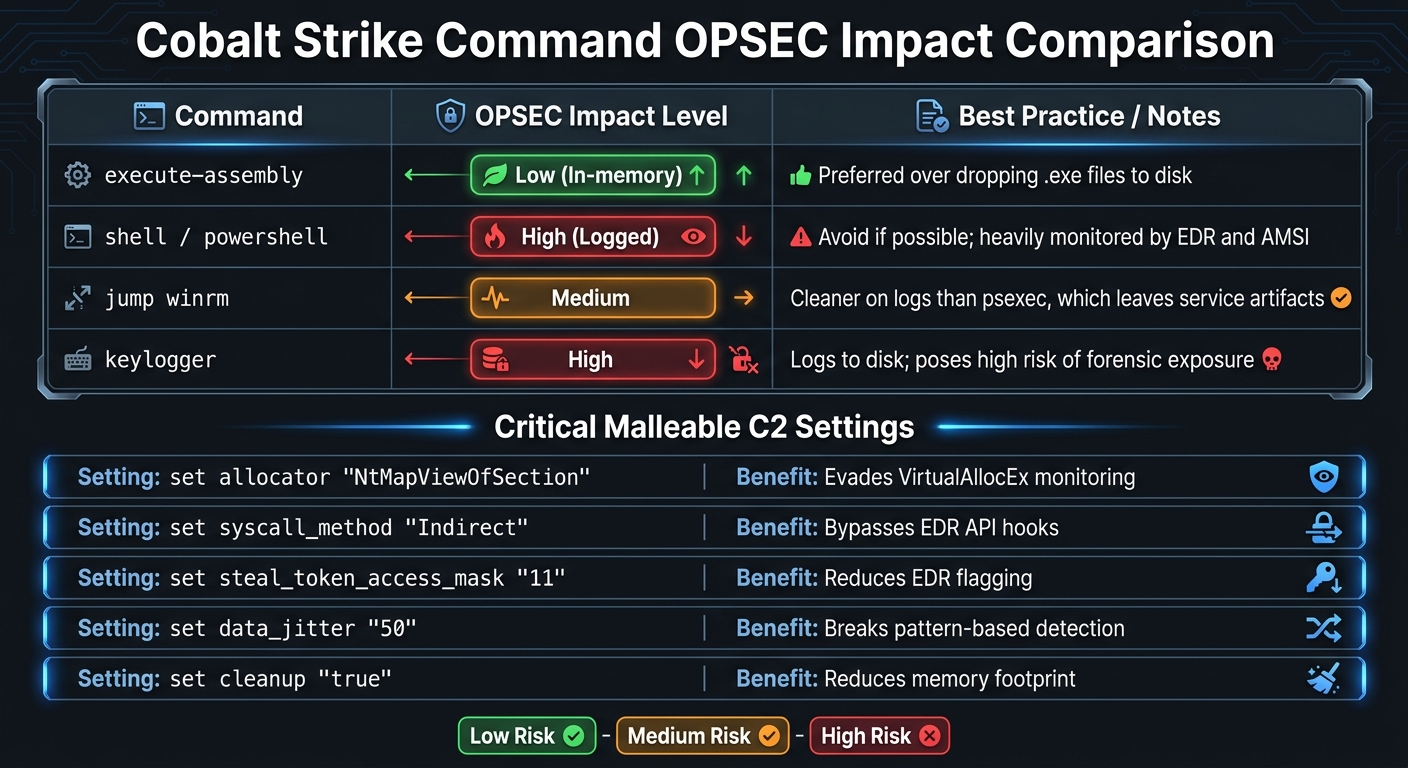
Cobalt Strike OPSEC Command Comparison: Low vs High Risk Operations
Using Redirectors and SSH Tunneling for Team Server Protection
To protect your team server, start by binding it exclusively to 127.0.0.1. This ensures access is restricted to secure tunnels only [9]. The default team server port is a well-known indicator often scanned by blue teams, so consider changing it or restricting access using firewalls like AWS Security Groups [8].
Secure the management port by establishing an SSH tunnel with the following command:
ssh -nNT -L 50050:127.0.0.1:50050 user@teamserver_ip [8].
Redirectors are another key layer of protection. These can be deployed using tools like socat for basic forwarding or Nginx/Apache with mod_rewrite for more advanced filtering. Redirectors act as intermediaries, proxying communications from targets to your team server. They can also filter traffic based on parameters defined in your Malleable C2 profile. If a redirector’s IP is blocked, it’s easy to replace without overhauling your backend infrastructure [20].
For a more resilient setup, adopt a tiered infrastructure:
- Tier 1: Short-lived delivery servers.
- Tier 2: Servers for interactive operations.
- Tier 3: Persistent infrastructure for low-and-slow activities [9].
To further obscure operator-to-team server traffic, consider tunneling through WebSockets or Cloudflare tunnels using tools like websocat [9]. Once your tunnels and redirectors are in place, shift your focus to minimizing artifacts left on target systems.
Managing Logs and Artifacts in Secure Environments
Beyond securing your infrastructure, reducing forensic footprints is critical during red team operations. Maintain detailed logs and timestamps of all actions for post-engagement analysis [5]. Simultaneously, prioritize in-memory execution methods, such as Beacon Object Files (BOFs) or the execute-assembly command, to avoid dropping executables to disk [5].
Regularly monitor the Web Log (View > Web Log) to detect any attempts by security tools or automated sandboxes to download stages from your infrastructure [13]. Manually delete the default stager and stager64 entries from the Sites tab to disable Metasploit compatibility, preventing the team server from emitting raw, un-obfuscated stages [13].
Use the clear command to remove queued tasks that haven’t executed yet – especially if operational needs change or queued commands pose unnecessary risks [8]. When transferring files from target hosts, leverage the Sync Files feature (View > Downloads) to securely retrieve them from the team server instead of using manual SCP transfers [2]. Lastly, always set a kill date for beacons to ensure they stop communication after the engagement ends [9].
| Command | OPSEC Impact | Best Practice |
|---|---|---|
| execute-assembly | Low (In-memory) | Preferred over dropping .exe files to disk [5] |
| shell / powershell | High (Logged) | Avoid if possible; these are heavily monitored by EDR and AMSI [5] |
| jump winrm | Medium | Cleaner on logs than psexec, which leaves service artifacts [5] |
| keylogger | High | Logs to disk; poses a high risk of forensic exposure [5] |
Scripting and Automation with Aggressor Scripts
Aggressor Script, built on the Sleep scripting language with a Perl-like syntax, allows operators to automate tasks, enhance the Cobalt Strike interface, and create automated agents that can run continuously [21]. Raphael Mudge, the creator of Cobalt Strike, describes it as:
Aggressor Script is the preferred way to add features to Cobalt Strike, override existing behaviors… and automate your engagements [23].
This scripting language is primarily used for two purposes: creating custom Aliases to introduce new Beacon commands and defining Events to trigger automated actions. For example, the beacon_initial event can be set to automatically execute reconnaissance commands like whoami or netstat [16]. Tyler Rosonke’s "Persistence Aggressor Script" showcases this functionality by adding a persistence command to Beacon, automating deployment via Windows Registry, schtasks, and WMI [22]. Similarly, Ari Davies developed the "Kickass Bot", which uses the headless agscript client to survey newly compromised systems and log collected information directly to the event log [22]. These automation tools significantly reduce manual effort while supporting operational security.
Scripts can be loaded permanently into the client through the Script Manager (Cobalt Strike → Script Manager) by integrating .cna files [21]. For debugging purposes, the Script Console (View → Script Console) is available, along with helpful commands like tron and profile [21]. To maintain proper logging and accountability during task automation, the &btask function should always be used. This ensures that actions are recorded with operator attribution and timestamps, which is essential for post-engagement reporting [16].
For operations requiring constant monitoring or automated responses in secure environments, the agscript utility provides a solution. It enables headless operation on Linux-based team servers, removing the need for a GUI [21][23]. This approach is especially useful in air-gapped or restricted networks, where automation must operate independently of client connections. A great example of this is the "Cobalt Strike Toolkit" by Alexander Rymdeko-Harvey and Brian R. This toolkit identifies Domain Admin privileges and attempts privilege elevation when sessions lack local administrator rights, further streamlining operations [22].
Applying Cobalt Strike in Red Team Scenarios
Experienced red team operators use Cobalt Strike in various engagement types, each designed to challenge and bypass different layers of defense.
One common approach is the External Breach Simulation, which focuses on exploiting vulnerabilities during the initial compromise [1]. This often involves phishing campaigns or targeting exposed services to establish a foothold. Once inside, operators use tools like HTTP(S) listeners and Malleable C2 profiles to maintain command and control while evading detection. From there, tactics extend to internal breach scenarios, where pre-existing access is leveraged to navigate and exploit compromised networks further.
The Assumed Breach scenario begins with existing intelligence such as network maps and credentials, simulating what an attacker could achieve once inside [1]. This method shifts focus from perimeter defenses to internal lateral movement. Operators frequently deploy SMB beacons and use commands like "jump" and "remote-exec" to pivot across network segments. These techniques often expose weaknesses in network segmentation and monitoring [3]. As highlighted in Cobalt Strike’s documentation, red team operations uncover unconventional attack paths, emphasizing the need for stronger internal defenses [1].
For organizations concerned with advanced persistent threats, the Embedded Long-Term Actor scenario recreates "low-and-slow" tactics over extended periods [1]. Operators configure beacons with long sleep intervals and high jitter to blend malicious activity into normal network traffic. This approach tests the ability of security teams to detect patient adversaries. Such scenarios are increasingly relevant due to frameworks like the Digital Operations Resilience Act (DORA) in the EU and updated NIST controls in the US, which require red team exercises [1]. Long-term tactics, combined with collaborative exercises, help refine detection and response strategies.
Purple Team Exercises leverage Cobalt Strike to train blue teams in real time, improving their understanding of attack methods and enhancing their defensive responses [1]. During these sessions, red team operators simulate realistic attacks – such as NTLM relaying with PortBender or credential harvesting using "dcsync" – to help blue teams fine-tune detection rules [3]. These exercises either confirm the effectiveness of existing defenses or reveal areas needing improvement.
Operators are increasingly adopting inline execution techniques using Beacon Object Files (BOFs) and fireAlias calls in Aggressor Scripts to minimize process creation and avoid triggering endpoint detection and response (EDR) alerts [2][4]. Additionally, modifying default artifacts – like the "spawnto" process and SMB pipe names such as "msagent_XX" – within Malleable C2 profiles helps evade signature-based detection [2][3]. These adjustments ensure stealthier operations and more effective engagement outcomes.
Resources for Continuous Skill Development
Cleared operators looking to sharpen their Cobalt Strike expertise have access to a variety of targeted training and community resources. For instance, Pluralsight offers an intermediate-level course titled "Post Exploitation Operations with Cobalt Strike" by Rishalin Pillay. With a solid rating of 4.5/5 from 149 reviews, this course dives into essential skills like beacon functionalities, credential harvesting, privilege escalation, and lateral movement – key areas for red team operations [25]. Additionally, Pluralsight’s SecureReady program caters specifically to government and cleared environments, featuring instructor-led workshops that complement their self-paced video lessons [28].
For a more in-depth understanding of the platform, the Cobalt Strike User Guide from Fortra is an essential resource. It covers critical features like Malleable C2, spear phishing tools, and reporting [26]. Raphael Mudge, the tool’s original creator, highlighted its flexibility:
It is not Cobalt Strike’s goal to provide evasion out-of-the-box. Instead, the product provides flexibility… to allow you to adapt the product to your circumstance and objectives [26].
Licensed users can also access the Cobalt Strike Arsenal (via Help -> Arsenal), which includes tools like the Applet Kit, Artifact Kit, and Resource Kit for customizing payloads and improving detection evasion [23]. Chapter 11 of the user guide is particularly valuable, focusing on the Malleable Command and Control language – a must-know for blending traffic with legitimate network indicators [26][2].
Community-Driven Resources
Beyond official materials, community resources offer practical, field-tested insights. TrustedSec provides detailed write-ups on advanced features like Beacon Object Files (BOFs) and process injection tactics through their "Not So Obvious Features" series [2]. For designing effective profiles, the Malleable C2 Design and Reference Guide by ThreatExpress is indispensable, especially for using the c2lint tool to validate configurations [12]. Other excellent resources include iRed.team, which focuses on red teaming experiments, and ObsidianStrike, which organizes command lists with OPSEC-focused notes for sensitive environments [5][29].
Advanced Training and Tools
For operators aiming to master more sophisticated techniques, programs like Zero-Point Security’s Red Team Ops I & II, Maldev Academy, and the Sektor7 Institute provide specialized training in EDR evasion and modern adversary tactics [6]. To automate and script tasks, the official Aggressor Script documentation and Sleep Manual are invaluable. These are complemented by Raphael Mudge’s GitHub Gists and Lee Kagan’s Aggressor Scripts Collection [24][23]. The Community Kit serves as a central hub for extensions and scripts contributed by practitioners around the globe [24].
Staying Updated
To keep skills sharp and stay informed about new features, operators should regularly visit the Cobalt Strike Blog and Video Library for updates on tools like External C2 and advanced evasion methods [23][27]. Resources like the Elevate Kit, which integrates public privilege escalation exploits with Beacon, and the agscript utility for running Aggressor Scripts headlessly, are also worth exploring for automating tasks like DNS beacon check-ins [24][23].
Conclusion
Mastering Cobalt Strike requires an unwavering focus on operational security (OPSEC) at every stage. This guide has highlighted the critical role of customizing Malleable C2 profiles, using Beacon Object Files for in-memory execution, and automating reconnaissance with Aggressor Scripts. These techniques are what distinguish skilled operators from those who inadvertently trigger alerts or jeopardize their missions.
Every operation demands precision and thoughtful decision-making. Whether you’re experimenting with Active Directory Certificate Services abuse, fine-tuning sleep intervals to evade endpoint detection and response (EDR) systems, or choosing jump winrm over psexec for stealthier lateral movement, the smallest choices can have a big impact. Custom configurations are essential for bypassing modern EDR detection [30]. Incorporate jitter into beacon sleep intervals, prioritize execute-assembly over shell commands, and ensure thorough artifact cleanup – all of which emphasize the need for ongoing skill enhancement.
These practices align with rigorous standards like those outlined by NIST and TIBER. As standards evolve – such as the upcoming TIBER requirements for financial institutions in 2025 – continuous learning becomes even more critical [1]. Resources like Zero-Point Security’s Red Team Ops certifications offer a solid starting point for sharpening your expertise.
Successful red teaming thrives on consistent practice, well-planned automation, and a steadfast commitment to operational security.
FAQs
What’s the safest way to run a Cobalt Strike team server without exposing port 50050?
To securely operate a Cobalt Strike team server without exposing port 50050, it’s essential to limit access at the network level. Use security groups or firewall rules to enforce these restrictions. Set up the server on a supported Linux system and bind it to localhost (127.0.0.1). Then, establish an SSH tunnel to forward the port securely to your attacking machine. This approach reduces the server’s exposure to the internet, making it harder for blue teams to detect.
How do I pick and validate a Malleable C2 profile that matches my target environment?
When working with a Malleable C2 profile, it’s often easier to modify an existing one rather than building one from the ground up. This approach not only saves time but also helps ensure better accuracy. Tools like c2lint can be invaluable for checking the syntax of your profile, ensuring everything is in order before deployment.
Focus on customizing key indicators, such as network traffic patterns and sleep times, to closely resemble the behavior of your target environment. This step is crucial for blending in and avoiding detection.
Once you’ve made the necessary adjustments, always test the profile in a controlled environment. Use the results to refine your configurations, addressing any issues or inconsistencies that arise. Continue this cycle of testing and refining until the profile meets your operational requirements. Finally, re-validate the profile to confirm it aligns with your intended objectives.
When should I use BOFs vs execute-assembly vs Fork&Run to minimize EDR alerts?
BOFs (Beacon Object Files) are a go-to choice for stealthy operations like custom process injection and executing shellcode, as they help evade typical detection patterns. execute-assembly stands out for running code directly in memory while avoiding detection, especially when used with tailored C2 profiles. On the other hand, Fork&Run techniques are effective for bypassing hooks and analyzing call stacks by imitating legitimate process behaviors. Your choice should align with your evasion objectives and the unique demands of your operation.