

Kali Linux is a specialized operating system designed for penetration testing, digital forensics, and security audits. It comes pre-installed with over 600 tools, making it a go-to platform for professionals in high-security environments. This guide focuses on configuring Kali Linux for secure operations, using essential tools like Nmap, OpenVAS, and Metasploit, and ensuring compliance with security clearance protocols.
Key Takeaways:
- Secure Setup: Verify downloads, use encrypted installations, and configure firewalls and VPNs for safe operations.
- Essential Tools: Leverage Nmap for network scanning, OpenVAS for vulnerability assessments, and Metasploit for exploitation testing.
- Compliance: Follow strict documentation practices, encrypt sensitive data, and adhere to frameworks like NIST SP 800-115.
- Skill Development: Certifications like OSCP and advanced Kali features (e.g., Undercover mode, custom ISOs) enhance expertise.
This guide outlines practical steps to operate Kali Linux effectively while meeting federal standards and maintaining security in sensitive environments.
Setting Up Kali Linux for Secure Operations
Installation Best Practices
Verify your download to ensure security. Always download the Kali Linux ISO from official sources and confirm its integrity using SHA256 checksums and PGP signatures [5]. This step is crucial to avoid using tampered or corrupted images, which could compromise your system.
When installing, opt for Guided – Encrypted LVM. This method encrypts your data and requires a boot password [4][5]. While the secure wipe process might take hours, it’s essential for clearing sensitive data [4]. Additionally, you’ll need to disable Secure Boot in your UEFI settings, as the Kali kernel isn’t signed and won’t be recognized otherwise [4].
Kali now defaults to a non-root user setup – stick with this for daily use [5]. Using a root account regularly increases the risk of exploitation, especially when working with testing tools. Decide whether you need bare metal or a virtual machine for your setup. Virtual machines are often preferred for their ability to take snapshots and easily revert to a clean state, making them perfect for most testing scenarios [5]. However, if your work involves advanced wireless testing or hardware-specific exploits, bare metal installations provide full hardware access [5].
Once the installation is complete, focus on securing your network settings.
Configuring Secure Network Settings
Start by running sudo apt update && sudo apt full-upgrade -y to ensure your system is patched against vulnerabilities [5]. Next, set up a firewall. Install and enable ufw (Uncomplicated Firewall) to block unwanted traffic: sudo ufw enable and sudo ufw default deny incoming [5].
Your VM’s network mode plays a significant role in security. Here’s a quick breakdown:
- NAT mode: Shares the host’s IP address, offering a secure way to download updates [6].
- Bridged mode: Connects the VM directly to the physical network, useful for scanning local networks but exposes the environment to LAN risks [6][7].
- Host-only adapters: Combined with VLANs, these isolate your testing environment entirely [5][7].
After configuring the network, run an ARP scan from within Kali to confirm it cannot detect unauthorized devices on the host network [7].
For added protection, route your traffic through encrypted tunnels using VPNs like OpenVPN or WireGuard [5]. When using command-line tools, you can route them through a proxy with proxychains4. For example, proxychains4 nmap <target> ensures your traffic is proxied [5]. Finally, disable any unused network interfaces to reduce your attack surface [5].
Pre-Testing Preparations
Before conducting any tests, tighten your virtual environment’s security settings. Harden your hypervisor by turning off integration features like shared clipboards, drag-and-drop functionality, shared folders, USB passthrough, and unused network adapters. These steps help prevent data leaks or VM escape attempts [7]. As the National Institute of Standards and Technology (NIST) advises:
"Virtual machine isolation is not absolute and must be reinforced through configuration and layered controls" [7].
To keep your system lean, install only the tools you need. For example, sudo apt install kali-linux-top10 provides essential tools without unnecessary extras [5]. Once everything is set up, updated, and secured, create a clean snapshot of your VM [7][5]. This allows you to quickly revert to a known-good state, ensuring a fresh start for every engagement.
sbb-itb-bf7aa6b
Linux for Ethical Hackers (2022 – Full Kali Linux Course)
Key Kali Linux Tools for Cleared Penetration Testing
After setting up a secure environment, the next step in penetration testing is choosing the right tools. For cleared testers, Nmap, OpenVAS, and Metasploit are essential. Each tool serves a specific purpose, and using them correctly ensures compliance while delivering detailed assessments.
Nmap for Network Mapping and Scanning
Nmap is a powerful tool for exploring networks and assessing security. It can perform tasks like ping scans, port scans, version detection, and OS fingerprinting [8][9].
For cleared environments, strict scope control is essential. Use the -iL flag to load a pre-approved list of IP addresses, ensuring scans are limited to authorized systems [9]. Adjust scan speeds based on the environment: lower settings like -T0 (Paranoid) or -T1 (Sneaky) reduce the risk of triggering intrusion detection systems, while higher settings (-T4 or -T5) prioritize speed in less sensitive situations. The -F flag can also be used to scan only the top 100 most common ports, minimizing network noise and scan duration [9].
The Nmap Scripting Engine (NSE) is another valuable feature, automating tasks like vulnerability checks. For example, running --script=ftp-vsftpd-backdoor.nse can help identify specific vulnerabilities [10]. To document your findings, use the -oA flag to save results in multiple formats and the ndiff utility to compare scan outputs over time [8].
| Flag | Feature | Use Case for Cleared Testers |
|---|---|---|
| -sn | Ping Scan | Locate live hosts without conducting a port scan |
| -sV | Version Detection | Identify service versions to map to known vulnerabilities |
| -Pn | Skip Host Discovery | Scan systems that block ICMP/ping requests |
| -oA | Output All Formats | Create detailed reports for auditing and documentation |
Once network mapping is complete, the next step is identifying vulnerabilities with a dedicated scanner.
OpenVAS for Vulnerability Assessments
OpenVAS uses the CVE database to uncover security flaws in software and system configurations [11]. Integrated into the Greenbone Vulnerability Management (GVM) framework, it provides a web-based interface for streamlined use [11][12]. With an extensive library of vulnerability signatures, OpenVAS is a comprehensive option for vulnerability scanning.
Before running OpenVAS, ensure your Kali VM is properly configured. Allocate at least 3 CPUs, 3GB of RAM, and 20–30GB of disk space for plugins and scan data [11][12]. Update the default admin password using:
sudo -u _gvm gvmd --user=admin --new-password=YourNewPassword Perform authenticated scans whenever possible to meet clearance standards. These scans delve deeper into installed software and configurations compared to unauthenticated ones [11][12]. Start by using Nmap to identify live hosts and open ports, then import those targets into OpenVAS for more focused scanning [12].
Verify your setup with:
sudo gvm-check-setup This ensures all components are installed correctly and the Network Vulnerability Test (NVT) feed is up to date. Export scan results in formats like PDF, CSV, TXT, or XML to meet documentation requirements [11]. As noted on the Kali Linux Blog:
"Vulnerability scanners scan for vulnerabilities–they are not magical exploit machines and should be one of many sources of information used in an assessment." [12]
Once vulnerabilities are identified, the next step is validating them with an exploitation framework.
Metasploit for Exploitation Testing
Metasploit is a comprehensive framework covering all phases of penetration testing, from researching vulnerabilities to developing exploits [13]. It includes over 4,000 modules, categorized into Exploits, Payloads, Auxiliary modules, Encoders, and Post modules [13][16].
For cleared testing, use the check command to verify vulnerabilities without exploiting them directly, ensuring controlled and compliant testing [13][15]. As the Metasploit documentation explains:
"It’s not always desirable to jump straight into exploiting a vulnerability but instead to determine if the target is vulnerable." [15]
To maintain consistency across modules, use the setg command to configure global parameters like RHOSTS [13]. Advanced post-exploitation tasks like privilege escalation can be performed using Meterpreter, which provides an interactive shell [13][17]. You can also keep sessions open while switching tasks by using CTRL+Z to background them.
For stealth, use evasion modules and encoders to bypass Host-Based Intrusion Prevention Systems (HIPS) and antivirus programs [13][14]. Always focus on precision and avoid unnecessary disruption.
Metasploit is free and open-source, though a commercial version (Metasploit Pro) offers additional features like phishing tools and enhanced AV evasion [15][16]. For cleared operations, the free version is generally sufficient, provided you follow strict security protocols to protect your testing environment [17].
Maintaining Compliance with Security Clearance Requirements
Using Kali Linux in environments requiring security clearance demands strict adherence to protocols. These safeguards are critical to protecting sensitive data and ensuring compliance with federal regulations. Any lapse could result in serious breaches or violations.
Data Protection and Privacy Measures
Encryption is non-negotiable for cleared testers. Tools like LUKS (Linux Unified Key Setup) should be used to encrypt partitions on laptops or USB drives containing sensitive data [19]. For those using a Live USB, an encrypted persistence partition is essential for securely storing documents and test results [19].
Another key measure is implementing a "nuke password" with the cryptsetup-nuke-password utility. This feature destroys encryption keys instantly during boot, making data completely inaccessible if you’re compromised. Here’s how to set it up:
sudo apt install -y cryptsetup-nuke-password sudo dpkg-reconfigure cryptsetup-nuke-password Avoid cloud-based AI tools during testing to protect sensitive information. As The Cyber Security Hub™ warns:
"Because Claude operates as a cloud-hosted model, sensitive data from penetration tests could be exposed outside secure environments."
Instead, opt for local large language model integrations like Ollama, which keep all prompts and findings offline [1][18].
Additionally, document every tool used in your Rules of Engagement (RoE) and maintain immutable audit logs of all activities. These records are essential for meeting compliance standards [3][18].
Ethical Guidelines for Cleared Penetration Testers
Before beginning any testing, always obtain written authorization. Using Kali Linux tools without explicit permission violates the Computer Fraud and Abuse Act (18 U.S.C. § 1030) [3]. Authorization should be clearly defined in your scope documentation and RoE [3].
Your RoE should also outline the boundaries of tool usage and testing environments. For federal work governed by frameworks like FISMA or FedRAMP, testing methodologies must align with established guidelines such as NIST SP 800-115. In financial settings, compliance with standards like PCI DSS v4.0 is required, which mandates external penetration testing at least annually [3].
When conducting remote assessments, use network isolation tools like OpenVPN or WireGuard to establish secure tunnels. If working in public or sensitive locations, enable "Kali Undercover" mode to blend in and avoid drawing attention [1].
Finally, handle captured data with utmost care. Encrypt files during and after engagements, and securely delete them using tools like shred -v [19]. Reports should always include human analysis and contextual insights, rather than relying solely on automated outputs [3].
Penetration Testing Workflow with Kali Linux
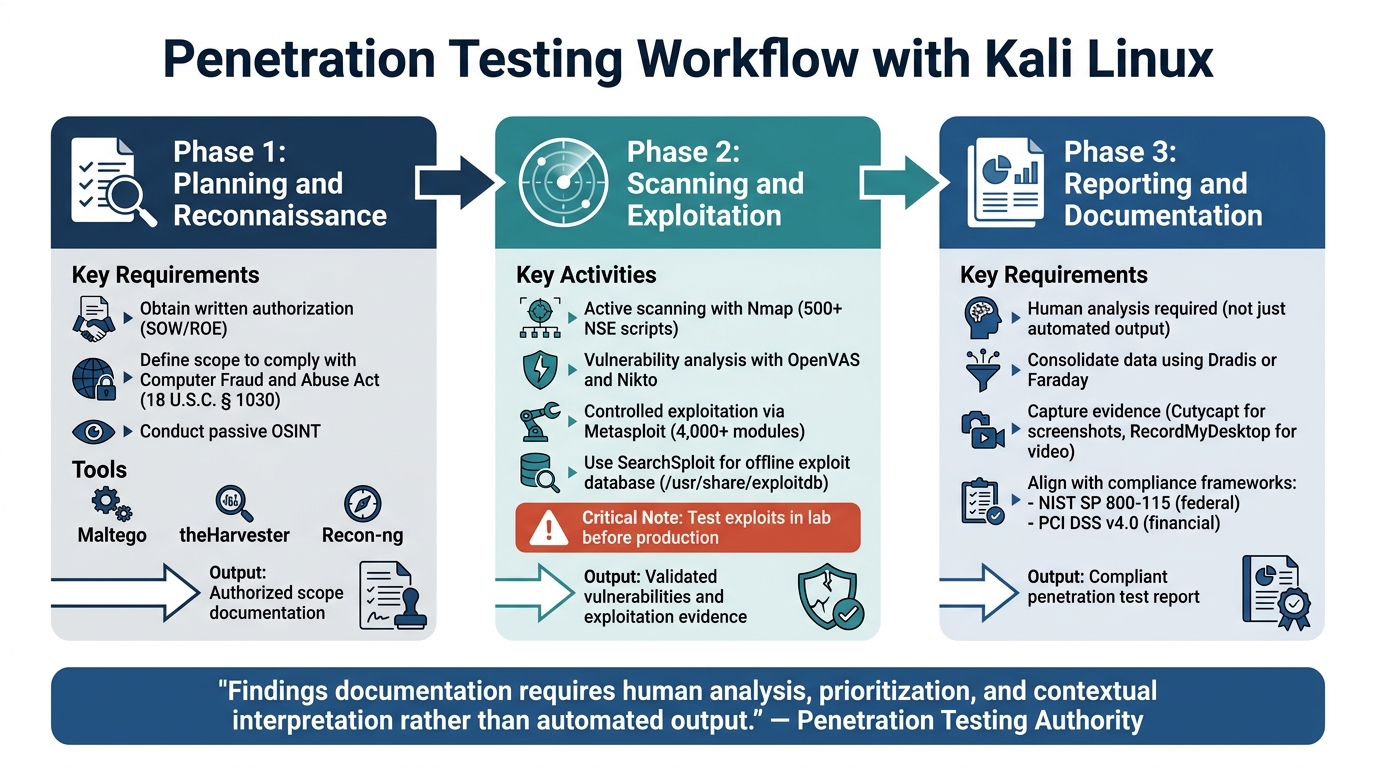
Kali Linux Penetration Testing Workflow: 3-Phase Security Assessment Process
Having a clear workflow is essential to ensure vulnerabilities are addressed while keeping the testing process within authorized boundaries. In sensitive environments, thorough documentation and strict compliance are crucial.
Planning and Reconnaissance
Before starting any testing, secure written authorization and define a detailed Scope of Work (SOW) or Rules of Engagement (ROE). Without these documents, you risk violating the Computer Fraud and Abuse Act (18 U.S.C. § 1030) [3]. The ROE should clearly outline the systems, networks, and methods you are allowed to test.
Begin by conducting passive reconnaissance using OSINT tools like Maltego, theHarvester, and Recon-ng. These tools gather publicly available information without directly interacting with the target [3]. Ensure all tools are up-to-date to avoid errors. Most importantly, follow the ROE at every step of the process.
Scanning and Exploitation
Once you have your scope and initial data, move to active scanning. Tools like Nmap are great for identifying live hosts, open ports, and service details. Nmap also offers over 500 NSE scripts for more advanced enumeration tasks [3]. Using db_nmap within the Metasploit Framework allows you to store scan results in a database, making it easier to manage findings during exploitation [22].
For vulnerability analysis, tools like OpenVAS and Nikto can help identify misconfigurations and outdated software [2][20]. After identifying vulnerabilities, use Metasploit’s exploit modules linked to specific CVEs for controlled exploitation [3]. If internet access is restricted, SearchSploit can query the local offline Exploit Database at /usr/share/exploitdb [21]. Always test exploit code in a lab environment before deploying it on production systems [21].
Reporting and Documentation
Once testing is complete, document all findings systematically. Avoid relying solely on automated tools; human analysis is critical for prioritizing and interpreting results. As the Penetration Testing Authority emphasizes:
"Findings documentation requires human analysis, prioritization, and contextual interpretation rather than automated output." [3]
Use frameworks like Dradis or Faraday to consolidate data from different tools [23]. Capture evidence using tools such as Cutycapt for screenshots and RecordMyDesktop for video [23]. Finally, ensure your reports align with relevant standards, such as NIST SP 800-115 for federal engagements or PCI DSS v4.0 for financial environments [3]. Proper documentation not only meets compliance requirements but also aids in professional development and training.
Skill Development for Cleared Penetration Testers
Continual skill development is what separates good penetration testers from outstanding ones. While Kali Linux provides over 600 testing tools, the real edge comes from mastering its advanced features and earning certifications that validate your expertise. These tools and credentials can elevate both your technical skills and your professional standing.
Learning Advanced Kali Linux Features
Going beyond the basics, several advanced features in Kali Linux can significantly improve your capabilities in cleared operations. For instance, ISO customization with metapackages lets you create streamlined versions of Kali tailored to specific missions. By installing only the tools you need, you can minimize the system’s footprint and optimize performance.
The Btrfs file system, with its "Unkaputtbar" feature, allows you to take snapshots of your system and roll back to a previous state – similar to virtual machine snapshots. This is especially useful when conducting intrusive tests or experimenting with new tools, as it provides a safety net to restore your system if something goes wrong. Additionally, understanding the LUKS nuke feature ensures you can quickly destroy data if your hardware is ever at risk of being compromised.
Another critical tool is Kali Undercover mode, which disguises the Kali interface for operations in shared environments. Beyond that, leveraging built-in support for Python and Bash can help automate repetitive tasks, while the Nmap Scripting Engine (NSE) allows you to craft custom scripts for targeted vulnerability detection.
Modern Kali Linux versions also support integrating large language models (LLMs) like Ollama for offline, local use. This feature translates natural language into technical commands, ensuring data remains secure without relying on external cloud services. For enterprise Active Directory environments, tools like BloodHound for attack path mapping and CrackMapExec for exploitation are invaluable. Meanwhile, the Kali Purple toolset offers over 100 tools for SIEM, incident response, and intrusion detection, supporting a Purple Team approach that blends offensive and defensive strategies.
Mastering these advanced tools and features not only enhances your technical capabilities but also prepares you for certifications that validate your skill set.
Certifications and Training Resources
Advanced skills and secure workflows are best complemented by formal certifications. Among these, the OSCP (Offensive Security Certified Professional) is widely regarded as the industry standard for penetration testing. Its associated course, PEN-200 (Penetration Testing with Kali Linux), covers a range of topics, including information gathering, vulnerability scanning, web application attacks, and Active Directory exploitation. The program culminates in a rigorous 24-hour practical exam.
"OSCP is the gold standard certification for penetration testing." – Cybersecurity Guide [25]
OSCP-certified professionals earn an average salary of $103,000, compared to $96,000 for those with CEH (Certified Ethical Hacker) certifications. The PEN-200 Course & Cert Bundle costs $1,749 and includes 90 days of lab access along with one exam attempt. For those seeking additional practice, the Learn One Subscription is available for $2,749 per year, providing access to one course and two exam attempts.
For more advanced training, the OSEP (Offensive Security Experienced Penetration Tester) certification focuses on advanced evasion techniques and Active Directory attacks. Other options like OSWA (Offensive Security Wireless Professional) and OSEE (Offensive Security Exploitation Expert) dive into wireless security and advanced exploitation techniques. The Kali Linux Certified Professional (KLCP) certification, centered on the PEN-103 (Kali Linux Revealed) course, is another excellent choice for those aiming to master the Kali Linux operating system.
To refine your tradecraft, consider tools like Git for version control, Obsidian for organizing documentation, and tmux for efficient terminal multiplexing. These tools can help streamline remote system management and improve your overall workflow.
"One hour per day of study in your chosen field is all it takes. One hour per day of study will put you at the top of your field within three years." – Earl Nightingale [24]
With job opportunities for Information Security Analysts expected to grow by 29% between 2024 and 2034, obtaining these certifications and honing your skills is a smart investment. Choose training programs that align with your career goals and the specific demands of the environments in which you operate.
Conclusion
This guide has highlighted the key steps and compliance standards essential for penetration testers working in regulated environments.
Kali Linux is a specialized platform built to meet penetration testing standards like NIST SP 800-115 and the Penetration Testing Execution Standard (PTES) [3]. For security-cleared testers, success with this platform requires not just technical skill but also a deep understanding of the compliance frameworks governing its use in federal and regulated sectors.
"The platform itself carries no legal status – authorization is determined by scope documentation and rules of engagement, not by the operating system used." – Penetration Testing Authority [3]
In these environments, every action must align with the Rules of Engagement and remain within the Authority to Operate boundaries required by frameworks like FISMA or FedRAMP [3]. Professional standards demand more than just automated tools – manual exploitation and analysis are critical to meeting high-level contractual expectations [3].
To excel, align your processes with recognized frameworks, use hardening tools to improve operational security, and pursue certifications like OSCP to validate your expertise. As covered earlier, mastering tools like Metasploit and obtaining advanced certifications are crucial for navigating the complexities of cleared environments. Proficiency in Kali Linux not only enhances your technical capabilities but also strengthens your ability to safeguard critical systems.
Regularly review your tools and workflows to ensure compliance, address skill gaps, and document your methods. Each improvement you make reinforces your effectiveness and credibility in sensitive roles. By adhering to strict compliance protocols and continuously refining your expertise, you position yourself as a reliable and trusted penetration tester in security-cleared environments.
FAQs
Should I run Kali on a VM or bare metal for cleared work?
Running Kali Linux on a virtual machine (VM) is often the preferred approach for secure tasks. VMs provide greater control, simpler management, the ability to use snapshots, and strong isolation – all essential for meeting security clearance requirements. Although installing Kali Linux directly on hardware (bare metal) is an option, it can introduce additional challenges related to security, hardware compatibility, and upkeep. This makes VMs a more practical and manageable solution, especially in environments where security is a top priority.
How do I keep Kali compliant with NIST SP 800-115 during testing?
To align Kali Linux with NIST SP 800-115, it’s essential to follow a structured testing methodology. This includes thorough planning, documenting every phase of the testing process, securing proper authorization, and keeping detailed records of findings and mitigation strategies. Additionally, incorporating standards like NIST 800-53 and DISA STIGs ensures your testing aligns with federal guidelines while staying within compliance requirements.
What’s the safest way to store and destroy sensitive test data in Kali?
To keep sensitive data safe in Kali Linux, you should rely on encrypted partitions or drives. Encryption ensures that unauthorized users cannot access your data, even if the storage device falls into the wrong hands.
When it comes to securely destroying data, tools like shred or dd are highly effective. These utilities overwrite files or entire drives with random data or zeros, making it nearly impossible to recover the original information. This step is crucial, especially when disposing of storage devices that contained highly sensitive data. Properly wiping data ensures it cannot be retrieved through recovery methods, keeping your information secure.